Arranging the window
In this tutorial you give the image the middle of the window, and move the buttons of the stages below it. It continues from Scanning a stage with the camera.
Each view says where it goes with its placement. You change two of them, and find out what the window remembers from one run to the next.
Before you start
What you need
The project folder as you left it, and nothing else.
Open first_session.py, and add this import below the ones it has:
1. Put the image in the centre
Every view you've written so far is a Dock, a panel
against one edge of the window. Central is the main
area of the window instead. In the class ImageView, change the placement
line to this one, and leave the rest of the class as it is:
Run the script:
The image now has the middle of the window, with the stages on its left and the plans on its right.
2. Move the stages to the bottom
In the class StageView, change the placement line to this one:
Run the script again. The stages are still on the left.
Nothing is wrong with the line. When you close the window, it saves where its docks are, and the next time it opens it puts them back, so a placement only says where a view goes when the window has nothing saved for it. The image moved at once in step 1 because a central view isn't a dock, so the window had nothing saved for it.
3. Forget the saved layout
The window keeps its layout in one file, named after the session. Close the window, then delete the file:
| Platform | File |
|---|---|
| Windows | %LOCALAPPDATA%\redsun\first-session.json |
| macOS | ~/Library/Application Support/redsun/first-session.json |
| Linux | ~/.config/redsun/first-session.json |
Run the script once more:
This time the stages are below the image. Choose snap in the list of the
plans and press Run:
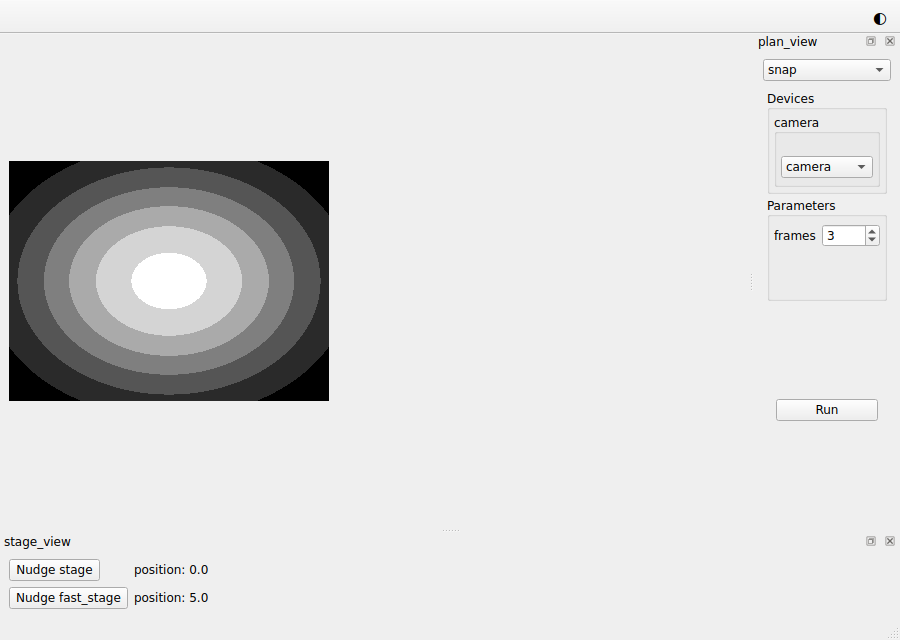
4. Move a dock by hand
Drag the view of the plans by its title, and drop it on the left edge of the window. Close the window and run the script again: the plans are on the left, where you left them.
The whole script
"""The session built in the "Arranging the window" tutorial."""

from __future__ import annotations

from collections.abc import Iterator, Mapping  # noqa: TC003
from functools import cached_property
from typing import Any, Protocol, runtime_checkable
from urllib.parse import urlsplit
from urllib.request import url2pathname

import bluesky.plan_stubs as bps
import bluesky.plans as bp
import h5py
import numpy as np
from bluesky.protocols import Readable, Reading, Triggerable
from bluesky.utils import MsgGenerator  # noqa: TC002
from event_model import DocumentRouter, StreamResource
from ophyd_async.core import (
    MovableLogic,
    SignalRW,
    StandardMovable,
    StandardReadable,
    soft_signal_rw,
)
from ophyd_async.sim import SimBlobDetector  # noqa: TC002
from psygnal import Signal
from qtpy.QtGui import QImage, QPixmap
from qtpy.QtWidgets import (
    QComboBox,
    QFormLayout,
    QLabel,
    QPushButton,
    QStackedWidget,
    QVBoxLayout,
    QWidget,
)

from redsun import (
    AsDevice,
    AsPresenter,
    AsView,
    CallbackType,
    DeviceMapping,
    DevicesOf,
    HasPlans,
    Link,
    Placement,
    PlanEntry,
    slot,
)
from redsun.engine import RunEngine
from redsun.presenter.plan_spec import (
    PlanSpec,
    collect_arguments,
    create_plan_spec,
    resolve_arguments,
)
from redsun.qt import Central, Dock, QtSession
from redsun.view.qt.utils import PlanWidget, create_plan_widget


class MyStage(StandardReadable, StandardMovable[float]):
    def __init__(self, name: str = "", *, units: str = "mm") -> None:
        with self.add_children_as_readables():
            self.position = soft_signal_rw(float, units=units)
        super().__init__(name=name)

    @cached_property
    def movable_logic(self) -> MovableLogic[float]:
        return MovableLogic(setpoint=self.position, readback=self.position)


class FastStage(StandardReadable, StandardMovable[float]):
    def __init__(self, name: str = "", *, units: str = "mm") -> None:
        with self.add_children_as_readables():
            self.position = soft_signal_rw(float, initial_value=5.0, units=units)
            self.speed = soft_signal_rw(float, initial_value=10.0)
        super().__init__(name=name)

    @cached_property
    def movable_logic(self) -> MovableLogic[float]:
        return MovableLogic(setpoint=self.position, readback=self.position)


@runtime_checkable
class HasPosition(Protocol):
    position: SignalRW[float]


@runtime_checkable
class Camera(Readable[Any], Triggerable, Protocol): ...


class StagePresenter:
    def __init__(
        self, name: str, *, stages: DevicesOf[HasPosition], step: float = 1.0
    ) -> None:
        self.name = name
        self.stages = stages
        self.step = step

    @slot
    async def nudge(self, stage: str) -> None:
        position = await self.stages[stage].position.get_value()
        await self.stages[stage].position.set(position + self.step)


class StageView(QWidget):
    placement: Placement = Dock("bottom")
    sig_nudge = Signal(str)

    def __init__(self, name: str, parent: QWidget) -> None:
        super().__init__(parent)
        self.name = name
        self.rows = QFormLayout(self)
        self.labels: dict[str, QLabel] = {}

    def add_row(self, stage: str) -> None:
        button = QPushButton(f"Nudge {stage}")
        button.clicked.connect(lambda: self.sig_nudge.emit(stage))
        self.labels[stage] = QLabel()
        self.rows.addRow(button, self.labels[stage])

    @slot
    def show_reading(self, reading: dict[str, Reading[float]]) -> None:
        for stage, entry in reading.items():
            if stage not in self.labels:
                self.add_row(stage)
            self.labels[stage].setText(f"position: {entry['value']}")


class StagePlans:
    def __init__(self, name: str) -> None:
        self.name = name

    def walk(
        self, stage: HasPosition, steps: int = 5, size: float = 1.0
    ) -> MsgGenerator[None]:
        for _ in range(steps):
            position = yield from bps.rd(stage.position)
            yield from bps.mv(stage.position, position + size)

    def plan_map(self) -> Mapping[str, PlanEntry]:
        return {"walk": {"plan": self.walk}}


class PlanPresenter:
    sig_started = Signal(str)
    sig_finished = Signal()

    def __init__(self, name: str, *, devices: DeviceMapping) -> None:
        self.name = name
        self.devices = devices
        self.engine = RunEngine()
        self.plans: dict[str, PlanEntry] = {}
        self.specs: dict[str, PlanSpec] = {}

    def setup(
        self,
        plan_sources: Mapping[str, HasPlans],
        callbacks: Mapping[str, CallbackType],
    ) -> None:
        for component in plan_sources.values():
            self.plans.update(component.plan_map())
        for plan, entry in self.plans.items():
            self.specs[plan] = create_plan_spec(entry["plan"], self.devices)
        for callback in callbacks.values():
            self.engine.subscribe(callback)

    @slot
    def run(self, plan: str, values: dict[str, Any]) -> None:
        resolved = resolve_arguments(self.specs[plan], values, self.devices)
        args, kwargs = collect_arguments(self.specs[plan], resolved)
        self.sig_started.emit(plan)
        future = self.engine(self.plans[plan]["plan"](*args, **kwargs))
        future.add_done_callback(lambda _: self.sig_finished.emit())


class PlanView(QWidget):
    placement: Placement = Dock("right")
    sig_run = Signal(str, dict)

    def __init__(self, name: str, parent: QWidget) -> None:
        super().__init__(parent)
        self.name = name
        self.chooser = QComboBox()
        self.pages = QStackedWidget()
        self.chooser.currentIndexChanged.connect(self.pages.setCurrentIndex)
        layout = QVBoxLayout(self)
        layout.addWidget(self.chooser)
        layout.addWidget(self.pages)
        self.widgets: dict[str, PlanWidget] = {}

    def setup(
        self, plan_sources: Mapping[str, HasPlans], devices: DeviceMapping
    ) -> None:
        for component in plan_sources.values():
            for entry in component.plan_map().values():
                self.add_plan(create_plan_spec(entry["plan"], devices))

    def add_plan(self, spec: PlanSpec) -> None:
        widget = create_plan_widget(
            spec, run_callback=lambda: self.ask_to_run(spec.name)
        )
        self.widgets[spec.name] = widget
        self.chooser.addItem(spec.name)
        self.pages.addWidget(widget.group_box)

    def ask_to_run(self, plan: str) -> None:
        self.setEnabled(False)
        self.sig_run.emit(plan, self.widgets[plan].parameters)

    @slot
    def on_finished(self) -> None:
        self.setEnabled(True)


class CameraPresenter(DocumentRouter):
    sig_frame = Signal(object)

    def __init__(self, name: str, *, cameras: DevicesOf[Camera]) -> None:
        super().__init__()
        self.name = name
        self.cameras = cameras
        self.written: tuple[str, str] | None = None

    def snap(self, camera: Camera, frames: int = 3) -> MsgGenerator[Any]:
        return (yield from bp.count([camera], num=frames))

    def plan_map(self) -> Mapping[str, PlanEntry]:
        return {"snap": {"plan": self.snap}}

    def stream_resource(self, doc: StreamResource) -> StreamResource:
        if doc["data_key"] in self.cameras:
            self.written = (doc["uri"], doc["parameters"]["dataset"])
        return doc

    @slot
    def show_last(self) -> None:
        if self.written is not None:
            uri, dataset = self.written
            with h5py.File(url2pathname(urlsplit(uri).path), "r") as file:
                self.sig_frame.emit(file[dataset][-1])
            self.written = None


class ImageView(QWidget):
    placement: Placement = Central()

    def __init__(self, name: str, parent: QWidget) -> None:
        super().__init__(parent)
        self.name = name
        self.image = QLabel("No image yet")
        QVBoxLayout(self).addWidget(self.image)

    @slot
    def show_frame(self, frame: object) -> None:
        values = np.asarray(frame, dtype=float)
        low, high = values.min(), values.max()
        grey = (255 * (values - low) / max(high - low, 1.0)).astype(np.uint8)
        height, width = grey.shape
        image = QImage(
            grey.tobytes(), width, height, width, QImage.Format.Format_Grayscale8
        )
        self.image.setPixmap(QPixmap.fromImage(image.copy()))


class ScanPlans:
    def __init__(self, name: str) -> None:
        self.name = name

    def scan(
        self,
        stage: HasPosition,
        camera: Camera,
        start: float = 0.0,
        stop: float = 5.0,
        points: int = 6,
    ) -> MsgGenerator[Any]:
        return (yield from bp.scan([camera], stage.position, start, stop, points))

    def plan_map(self) -> Mapping[str, PlanEntry]:
        return {"scan": {"plan": self.scan}}


class FirstSession(QtSession):
    config = "session.yaml"
    stage: AsDevice[MyStage]
    fast_stage: AsDevice[FastStage]
    camera: AsDevice[SimBlobDetector]
    stage_ctrl: AsPresenter[StagePresenter]
    stage_plans: AsPresenter[StagePlans]
    plan_ctrl: AsPresenter[PlanPresenter]
    camera_ctrl: AsPresenter[CameraPresenter]
    scan_plans: AsPresenter[ScanPlans]
    stage_view: AsView[StageView]
    plan_view: AsView[PlanView]
    image_view: AsView[ImageView]

    def wire(self) -> Iterator[Link]:
        yield self.stage_view.sig_nudge, self.stage_ctrl.nudge
        yield self.stage.position, self.stage_view.show_reading
        yield self.fast_stage.position, self.stage_view.show_reading
        yield self.plan_view.sig_run, self.plan_ctrl.run
        yield self.plan_ctrl.sig_finished, self.plan_view.on_finished
        yield self.plan_ctrl.sig_started, self.path_provider.set_plan
        yield self.plan_ctrl.sig_finished, self.path_provider.reset_plan
        yield self.plan_ctrl.sig_finished, self.camera_ctrl.show_last
        yield self.camera_ctrl.sig_frame, self.image_view.show_frame


if __name__ == "__main__":
    FirstSession().run()
What you built
You arranged the window with the image in its centre, the stages below it and the plans beside it. Each view starts where its placement says, and stays where you drag it.
Next steps
- Putting a device behind a service is the next tutorial, where you add a stage that lives in a program of its own.
- How a frontend shows a session on screen lists the placements, along with the menus and toolbars.
- How to save a session says what else the file from step 3 holds.