How to choose a style
A Qt session looks like the other programs on your computer, because it uses
the style your platform gives every window. You can give it another look:
napari's, an image viewer many labs already use, or qlementine's. The
napari style comes with redsun, and you turn it on with one line; the
qlementine style needs an extra, and has a section of its own below.
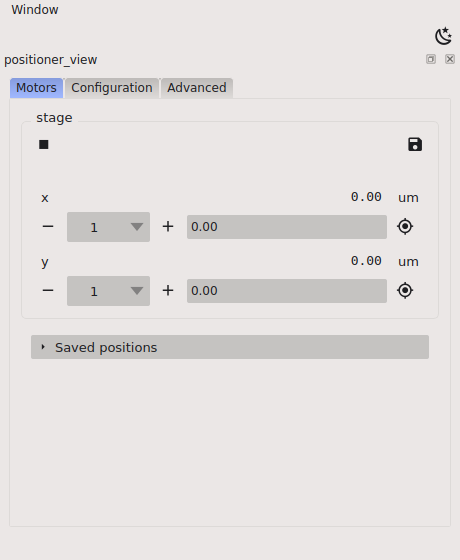
To see the style before you write a session, run the example with it:
Prerequisites
You need a QtSession. The style is a
hook provider, so
How to install hooks explains the two ways of installing
it shown below.
Turn on the napari style
Install NapariStyle at the configure_application hook point:
The window then takes napari's colours and font sizes, and napari's own
pictures for check boxes, arrows and other small controls. The buttons of the
built-in views keep redsun's own icons, which take the theme's text colour,
so they are light in the dark theme and dark in the light one. A view of
your own gets the same icons from
redsun.view.qt.icons.
Set the font size
The style uses napari's font size, 9 points, or 12 on macOS. Give
font_size to choose your own, in points:
Use it beside a provider of your own
configure_application takes several providers, so the style doesn't use
the point up. List it with yours, and they run in the order you list them:
Switch between dark and light
The style follows the session's colour scheme, so it has a dark and a light
theme and needs no setting of its own. The colour scheme button on the
toolbar switches between them while the session runs, and the
color_scheme key of the
session file chooses where it starts. When the scheme is system and your
platform doesn't say which it prefers, the style uses the light theme.
Undo the style
The napari style keeps the stylesheet the application had before. When the
session shuts down, the style puts it back and stops following the colour
scheme.
Where napari's files come from
The stylesheets and icons are napari 0.9.2's, copied unchanged into
redsun.qt.styles, so napari doesn't need to be installed. They stay under
napari's BSD 3-Clause licence, which is beside them. When the session
builds, the style writes the icons of both themes, in their colours, to your
user cache folder, and a file that hasn't changed isn't written again.
Use the qlementine style
qlementine is a style that draws every control itself, where the napari
style is a stylesheet over your platform's:
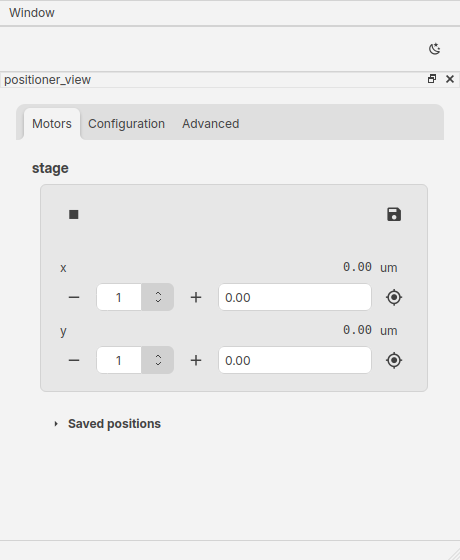
redsun doesn't ship it, so install the extra for your Qt binding first:
pip install "redsun[qlementine-pyqt]"     # with PyQt6
pip install "redsun[qlementine-pyside]"   # with PySide6
Then install QlementineStyle at the same hook point:
To see it first, run redsun --example qlementine.
The style follows the colour scheme as the napari style does. It changes
the application's font as well as its colours. When the session shuts down
it puts back the style, the font and the palette the application had.
qlementine draws every icon in the window in one colour, the colour of the
control the icon is on. That keeps the icons of the built-in views readable
in both themes, and it takes the colours away from an icon of your own that
has several. To keep them on one widget, tell qlementine so for that
widget:
import PyQt6Qlementine as qlementine  # or PySide6Qlementine

qlementine.QlementineStyle.setAutoIconColor(my_widget, qlementine.AutoIconColor.None_)
Before you choose it:
- Its packages exist for Windows on x64, macOS on Apple silicon and Linux on x64 only.
qlementine-pysideinstalls the wholepyside6at version 6.10.2, the one version its package accepts.PyQt6-Qlementineis under the GPL-3.0 licence, aspyqt6is.PySide6-Qlementineis under the MIT licence.- If the package is missing, the session logs the extra to install and
starts with your platform's look. A session that sets
strictstops instead.
Give qlementine your own theme
You can replace qlementine's dark theme, its light theme or both with a
theme file of your own. Give the file's path as dark or light:
The scheme you don't give keeps qlementine's own theme, so the colour
scheme control still switches between the two. For one theme in both
schemes, give the same file as dark and light.
A theme file is JSON. It needs a meta entry holding name, author and
version, and every colour it leaves out takes qlementine's default,
which is the light theme's. The easiest start is a copy of a built-in theme,
which you then edit:
from pathlib import Path

import PyQt6Qlementine as qlementine  # or PySide6Qlementine

document = qlementine.Theme.makeDark().toJson()
Path("themes").mkdir(exist_ok=True)
Path("themes/my-dark.json").write_bytes(bytes(document.toJson()))
Write a colour as #rrggbb, or #rrggbbaa with its opacity last.
qlementine uses its default for a value it can't read, so a misspelt
colour leaves the default in place. The session logs a warning for a key
qlementine doesn't know and for a value of the wrong kind, such as text
where a number belongs.
The session reads a relative path from the folder the program starts in.
If it can't read a file, it logs which one and starts with your platform's
look, and a session that sets strict stops instead.
Turn qlementine's animations off
qlementine animates a control as it changes, such as a button you point
at. Give animations: false to draw every change at once:
In a session class, write Declare(animations=False), as for a theme.
See also
- How to install hooks shows how to write a style of
your own, as a
configure_applicationprovider. - ADR 30 records why the files are copied.
- ADR 32
records why
qlementinehas one extra per Qt binding.
The example in full
The whole script
"""The session of the guide "How to choose a style"."""

from __future__ import annotations

from collections.abc import Iterator  # noqa: TC003
from functools import cached_property
from typing import Any, ClassVar

from ophyd_async.core import (
    MovableLogic,
    StandardMovable,
    StandardReadable,
    StandardReadableFormat,
    soft_signal_rw,
)

from redsun import AsDevice, AsHook, AsPresenter, AsView, Link, links_between
from redsun.engine import RunEngine
from redsun.presenter import PositionerPresenter  # noqa: TC001
from redsun.qt import QtSession
from redsun.qt.styles.napari import NapariStyle  # noqa: TC001
from redsun.view.qt.builtins import PositionerView  # noqa: TC001


class MyAxis(StandardReadable, StandardMovable[float]):
    def __init__(self, name: str = "") -> None:
        with self.add_children_as_readables(StandardReadableFormat.HINTED_SIGNAL):
            self.position = soft_signal_rw(float, 0.0, units="um", precision=2)
        with self.add_children_as_readables(StandardReadableFormat.CONFIG_SIGNAL):
            self.velocity = soft_signal_rw(float, 100.0, units="um/s")
        super().__init__(name=name)

    @cached_property
    def movable_logic(self) -> MovableLogic[float]:
        return MovableLogic(setpoint=self.position, readback=self.position)


class MyStage(StandardReadable):
    def __init__(self, name: str = "") -> None:
        self.x = MyAxis()
        self.y = MyAxis()
        self.add_readables([self.x, self.y])
        super().__init__(name=name)


class MyController:
    def __init__(self, name: str) -> None:
        self.name = name
        self.engine = RunEngine()


class MyApp(QtSession):
    config: ClassVar[dict[str, Any]] = {"session": "my-lab", "color_scheme": "dark"}

    configure_application: AsHook[NapariStyle]

    stage: AsDevice[MyStage]
    ctrl: AsPresenter[MyController]
    positioner: AsPresenter[PositionerPresenter]
    positioner_view: AsView[PositionerView]

    def wire(self) -> Iterator[Link]:
        yield from links_between(self.positioner_view, self.positioner)
        yield self.ctrl.engine.sig_locks_changed, self.positioner_view.set_locked
        yield self.ctrl.engine.sig_locks_changed, self.positioner.set_locked


if __name__ == "__main__":
    MyApp().run()