How to switch and dim lights
The built-in light stack switches your light sources on and off and sets their intensity. When you add it to a session, its presenter does that work, and its view has a group per light. ADR 21 explains the design.
Prerequisites
You need devices with an enabled signal, and an intensity signal for those
you dim. The Python blocks below are parts of one script, and the whole script
is at the end.
What makes a device a light
A device is a light when its enabled is a boolean signal it can write. If it
also has an intensity, a numeric signal it can write, you can dim it, while a
light without one only switches on and off. The presenter skips a device whose
enabled is not a boolean signal, such as a detector with an enabled
counter.
The wavelength and other details aren't part of this contract. Declare them as
configuration, with StandardReadableFormat.CONFIG_SIGNAL, and they appear in
the view's Configuration tab:
class LimitedBackend(SoftSignalBackend[float]):
    """Keeps a value in memory and reports limits, as a hardware record does."""

    async def get_datakey(self, source: str) -> DataKey:
        key = await super().get_datakey(source)
        key["limits"] = {"control": {"low": 0.0, "high": 50.0}}
        return key


class MyLaser(StandardReadable):
    def __init__(self, name: str = "") -> None:
        with self.add_children_as_readables():
            self.enabled = soft_signal_rw(bool, False)
            self.intensity = SignalRW(
                LimitedBackend(float, 10.0, units="mW", precision=1)
            )
        with self.add_children_as_readables(StandardReadableFormat.CONFIG_SIGNAL):
            self.wavelength = soft_signal_rw(int, 488, units="nm")
        super().__init__(name=name)


class MyLed(StandardReadable):
    def __init__(self, name: str = "") -> None:
        with self.add_children_as_readables():
            self.enabled = soft_signal_rw(bool, True)
        super().__init__(name=name)
An intensity whose descriptor reports limits, as an EPICS record does, gets a
slider as well as a number field. The LimitedBackend above stands in for such
a device. A soft signal reports no limits, so a light whose intensity has none
gets the number field alone.
Declare it in a session file
Both components are built into redsun, under the plugin id lights:
presenters:
  lights:
    plugin_name: redsun
    plugin_id: lights
views:
  lights_view:
    plugin_name: redsun
    plugin_id: lights
pairs:
  - [lights_view, lights]
The pairing makes the seven links between the two. Written out, they are:
The same links under wiring
wiring:
  lights_view.sig_enabled: lights.set_enabled
  lights_view.sig_intensity: lights.set_intensity
  lights_view.sig_configure: lights.configure
  lights.sig_enabled: lights_view.update_enabled
  lights.sig_intensity: lights_view.update_intensity
  lights.sig_failed: lights_view.set_failed
  lights.sig_configuration: lights_view.update_configuration
The presenter takes every light of the session, or only those named under
include. It leaves out, with a warning, a light it can't read within
timeout seconds (10 by default) when the session starts.
Declare it in Python
In a session class, declare both components and pair them in wire():
class MyApp(QtSession):
    config: ClassVar[dict[str, Any]] = {"session": "my-lab"}

    laser: AsDevice[MyLaser]
    led: AsDevice[MyLed]
    lights: AsPresenter[LightPresenter]
    lights_view: AsView[LightView]

    def wire(self) -> Iterator[Link]:
        yield from links_between(self.lights_view, self.lights)


if __name__ == "__main__":
    MyApp().run()
Use the view
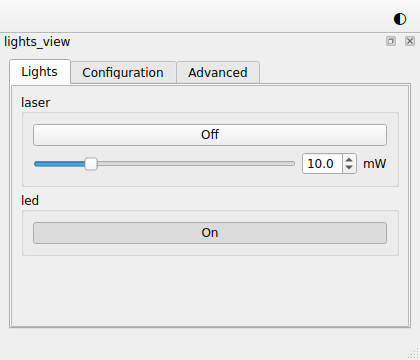
- The button of each light says whether it is on, as the light reads back. A click asks for the other state, and the button changes when the light confirms it.
- The slider and the number field show the intensity the light reads back, except while you drag the slider or type in the field. The view writes the intensity when you let the slider go, when you press Enter or leave the field after changing it, and at each step of the field's arrows or the slider's keys. Leaving the field unchanged writes nothing.
- With "Write while dragging" ticked in the Advanced tab, the view also writes
the intensity during a drag, at most every 100 ms. The view's
write_while_draggingkeyword sets the default. Once you tick or clear the box, the session'sSettingskeep your choice, and it wins over the keyword. - When you ask for intensities faster than the light answers, only the newest is written after the one in progress.
- A value outside the limits, an intensity for a light without one, or a write that fails shows in the light's group, after "failed".
- The Configuration tab shows each light's configuration, such as its wavelength, and writes the entries that can be written.
Hold the lights during a plan
A plan that locks a light disables its controls, and the presenter refuses
writes to it. The engine isn't a session component, so you make these links in
wire(), from the presenter that holds the engine:
yield self.ctrl.engine.sig_locks_changed, self.lights_view.set_locked
yield self.ctrl.engine.sig_locks_changed, self.lights.set_locked
With the built-in acquisition stack, pairing its presenter with the view,
- [acquisition, lights_view], makes the view's link, and pairing it with
the presenter, - [acquisition, lights], makes the presenter's.
Run plans from the window
shows how.
Customize it
The view takes a group_class for the widget built per light, and its tabs
property holds the Lights, Configuration and Advanced tabs, to which a
subclass may add. A stack of your own that reads and writes device
configuration can use the same classes the light stack and the positioner do:
DeviceConfiguration in the
presenter and ConfigurationTab
in the view.
The example in full
The whole script
"""A session switching and dimming two lights with the built-in light stack."""

from __future__ import annotations

from collections.abc import Iterator  # noqa: TC003
from typing import TYPE_CHECKING, Any, ClassVar

from ophyd_async.core import (
    SignalRW,
    SoftSignalBackend,
    StandardReadable,
    StandardReadableFormat,
    soft_signal_rw,
)

from redsun import AsDevice, AsPresenter, AsView, Link, links_between
from redsun.presenter import LightPresenter  # noqa: TC001
from redsun.qt import QtSession
from redsun.view.qt.builtins import LightView  # noqa: TC001

if TYPE_CHECKING:
    from event_model import DataKey


class LimitedBackend(SoftSignalBackend[float]):
    """Keeps a value in memory and reports limits, as a hardware record does."""

    async def get_datakey(self, source: str) -> DataKey:
        key = await super().get_datakey(source)
        key["limits"] = {"control": {"low": 0.0, "high": 50.0}}
        return key


class MyLaser(StandardReadable):
    def __init__(self, name: str = "") -> None:
        with self.add_children_as_readables():
            self.enabled = soft_signal_rw(bool, False)
            self.intensity = SignalRW(
                LimitedBackend(float, 10.0, units="mW", precision=1)
            )
        with self.add_children_as_readables(StandardReadableFormat.CONFIG_SIGNAL):
            self.wavelength = soft_signal_rw(int, 488, units="nm")
        super().__init__(name=name)


class MyLed(StandardReadable):
    def __init__(self, name: str = "") -> None:
        with self.add_children_as_readables():
            self.enabled = soft_signal_rw(bool, True)
        super().__init__(name=name)


class MyApp(QtSession):
    config: ClassVar[dict[str, Any]] = {"session": "my-lab"}

    laser: AsDevice[MyLaser]
    led: AsDevice[MyLed]
    lights: AsPresenter[LightPresenter]
    lights_view: AsView[LightView]

    def wire(self) -> Iterator[Link]:
        yield from links_between(self.lights_view, self.lights)


if __name__ == "__main__":
    MyApp().run()