How to run plans from the window
Add the built-in acquisition stack to a session, and you can run plans from the window. Its presenter runs the plans your components offer, one at a time, and its view is where you choose a plan, fill its parameters, and run, pause and stop it. ADR 22 explains the design.
Prerequisites
You need components offering plans, which means anything with a plan_map
method, as HasPlans describes. The Python blocks below are
parts of one script, and the whole script is at the end.
class MyPlans:
    def __init__(self, name: str) -> None:
        self.name = name

    def plan_map(self) -> Mapping[str, PlanEntry]:
        return {"walk": {"plan": self.walk}}

    def walk(
        self, motor: Movable[float], steps: int = 3, size: float = 1.0
    ) -> MsgGenerator[None]:
        """Move *motor* by *size* *steps* times."""
        for step in range(1, steps + 1):
            yield from bps.mv(motor, step * size)
The presenter gathers the plans of every such component when the session sets it up. It leaves out, with a warning naming it, a plan whose signature no plan widget can show.
Declare it in a session file
Both components are built into redsun, under the plugin id acquisition:
presenters:
  acquisition:
    plugin_name: redsun
    plugin_id: acquisition
views:
  acquisition_view:
    plugin_name: redsun
    plugin_id: acquisition
pairs:
  - [acquisition_view, acquisition]
The pairing makes the twelve links between the two. Written out, they are:
The same links under wiring
wiring:
  acquisition_view.sig_launch: acquisition.launch
  acquisition_view.sig_pause: acquisition.pause
  acquisition_view.sig_resume: acquisition.resume
  acquisition_view.sig_stop: acquisition.stop
  acquisition_view.sig_action: acquisition.request_action
  acquisition_view.sig_base_dir: acquisition.set_base_dir
  acquisition.sig_plan_started: acquisition_view.set_started
  acquisition.sig_plan_done: acquisition_view.set_done
  acquisition.sig_plan_failed: acquisition_view.set_failed
  acquisition.sig_progress: acquisition_view.update_progress
  acquisition.sig_action_changed: acquisition_view.update_action
  acquisition.sig_base_dir_changed: acquisition_view.update_base_dir
Declare it in Python
In a session class, declare both components and pair them in wire():
class MyApp(QtSession):
    config: ClassVar[dict[str, Any]] = {"session": "my-lab"}

    motor: AsDevice[MyMotor]
    plans: AsPresenter[MyPlans]
    acquisition: AsPresenter[AcquisitionPresenter]
    acquisition_view: AsView[AcquisitionView]

    def wire(self) -> Iterator[Link]:
        yield from links_between(self.acquisition_view, self.acquisition)


if __name__ == "__main__":
    MyApp().run()
Use the view
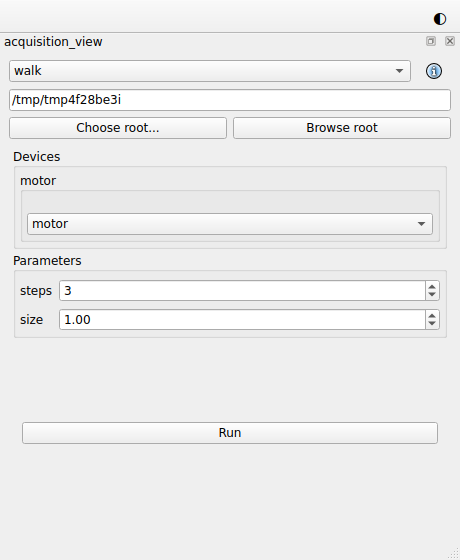
- Choose a plan in the list at the top, and the button beside it shows the plan's documentation. The plan's parameters, devices and the callbacks to attach follow below.
- Run starts the plan. The view shows it running once the presenter reports
that it started, and Run becomes Stop. A plan marked
@continuous(pausable=True)also has Pause, which becomes Resume. See Write a plan that runs until stopped. - Run stays disabled while a list of devices the plan needs is empty.
- When a plan raises, its plan widget shows "failed:" and the error until it runs again, and the session log holds the full traceback.
- Each run's files are named after its plan. "Choose root..." sets the directory runs write under, and "Browse root" opens it in the system's file browser.
- The session's
Settingskeep the plan you chose last, under the view's name, and the next session offers it again.
Share the engine
The presenter owns the session's RunEngine and its
Deferrals, and shares both. Any component that
asks for a RunEngine or Deferrals in setup receives the presenter's own.
class MyController:
    def setup(self, engine: RunEngine, deferrals: Deferrals) -> None:
        self.engine = engine
        self.deferrals = deferrals
A second acquisition presenter stops the session from building
Two acquisition presenters would both share a RunEngine, and the session
refuses to build. Declare one.
The presenter also passes on the engine's locks. The light view and the light presenter can take them through a pairing each:
The positioner view and presenter take them the same way:
Offer actions
A component whose plans wait for the user, through an
ActionManager held as actions, is a
HasActions. The presenter passes on the state of every
such component's actions, so their buttons in the plan widget follow them with
no link of their own, and a press reaches the component of the running plan.
The example in full
The whole script
"""A session running plans from the window with the built-in acquisition stack."""

from __future__ import annotations

from collections.abc import Iterator, Mapping  # noqa: TC003
from functools import cached_property
from typing import Any, ClassVar

import bluesky.plan_stubs as bps
from bluesky.protocols import Movable  # noqa: TC002
from bluesky.utils import MsgGenerator  # noqa: TC002
from ophyd_async.core import (
    MovableLogic,
    StandardMovable,
    StandardReadable,
    soft_signal_rw,
)

from redsun import (
    AsDevice,
    AsPresenter,
    AsView,
    Link,
    PlanEntry,
    links_between,
)
from redsun.presenter import AcquisitionPresenter  # noqa: TC001
from redsun.qt import QtSession
from redsun.view.qt.builtins import AcquisitionView  # noqa: TC001


class MyMotor(StandardReadable, StandardMovable[float]):
    def __init__(self, name: str = "") -> None:
        with self.add_children_as_readables():
            self.position = soft_signal_rw(float, 0.0, units="mm")
        super().__init__(name=name)

    @cached_property
    def movable_logic(self) -> MovableLogic[float]:
        return MovableLogic(setpoint=self.position, readback=self.position)


class MyPlans:
    def __init__(self, name: str) -> None:
        self.name = name

    def plan_map(self) -> Mapping[str, PlanEntry]:
        return {"walk": {"plan": self.walk}}

    def walk(
        self, motor: Movable[float], steps: int = 3, size: float = 1.0
    ) -> MsgGenerator[None]:
        """Move *motor* by *size* *steps* times."""
        for step in range(1, steps + 1):
            yield from bps.mv(motor, step * size)


class MyApp(QtSession):
    config: ClassVar[dict[str, Any]] = {"session": "my-lab"}

    motor: AsDevice[MyMotor]
    plans: AsPresenter[MyPlans]
    acquisition: AsPresenter[AcquisitionPresenter]
    acquisition_view: AsView[AcquisitionView]

    def wire(self) -> Iterator[Link]:
        yield from links_between(self.acquisition_view, self.acquisition)


if __name__ == "__main__":
    MyApp().run()