Describing a device with a protocol
In this tutorial you add a second stage to the session, of a different class, and the presenter and view you already wrote control it too. To get there, you change how the presenter asks for its devices, and nothing in the view. It continues from Writing your first session.
You start by checking the types of the script. Then you write a protocol, which describes the attributes and methods a device must have, ask the session for the devices that satisfy it, and add the stage.
Before you start
What you need
A type checker. This tutorial uses
mypy, which doesn't come with
redsun, so add it to the project as a development tool:
Open first_session.py as you left it at the end of
Writing your first session. You keep working in this
file until the last tutorial. Each tutorial adds to what's there, and when a
line you wrote has to change, the page shows it highlighted.
1. Check the types
Even though the script runs, mypy finds two errors in it:
first_session.py:29: error: "Device" has no attribute "position"  [attr-defined]
first_session.py:30: error: "Device" has no attribute "position"  [attr-defined]
Found 2 errors in 1 file (checked 1 source file)
The line numbers in your file may differ, but the two lines are the ones in
nudge that read and set the position.
devices is a DeviceMapping, which holds every
device of the session, of any kind. So all the type checker knows about one
of them is that it's a device, and not every device has a position.
2. Say what the presenter needs
The presenter needs only one thing from a stage, a position it can read and
set. Write that down as a protocol, above StagePresenter:
Add the imports it needs below the ones the file has. The line
from __future__ import annotations stays first in the file:
MyStage doesn't inherit from HasPosition, and you don't change it. It
satisfies the protocol because it has a position of that type, which is
called structural subtyping.
runtime_checkable lets Python make the same
check while the program runs, which the next tutorial relies on.
3. Ask for the devices that fit
Change the constructor of StagePresenter as highlighted. Where it asked for
a DeviceMapping under the name devices, it now asks for
DevicesOf[HasPosition] under the name stages. The
rest of the class stays as it is:
class StagePresenter:
def __init__(
self, name: str, *, stages: DevicesOf[HasPosition], step: float = 1.0
) -> None:
self.name = name
self.stages = stages
self.step = step
Add one more import, below the others:
The session now passes only the devices that satisfy HasPosition, by name,
and leaves the others out. It reads what to pass from the type of the
parameter, so the name of the parameter is yours to choose.
Imports on more than one line
The file now imports from redsun on two lines, which Python allows.
The whole script at the end of each page gathers such lines into one, as
a formatter would. It also drops the import of DeviceMapping, which
nothing uses for now. Leave it in your file, because a later tutorial
needs it again.
4. Check the types again
Run the script. The window hasn't changed, and the button moves the stage as before:
5. Add a second stage
Add a second device below MyStage. It starts at 5.0, and it has a speed,
which the first one lacks:
class FastStage(StandardReadable, StandardMovable[float]):
def __init__(self, name: str = "", *, units: str = "mm") -> None:
with self.add_children_as_readables():
self.position = soft_signal_rw(float, initial_value=5.0, units=units)
self.speed = soft_signal_rw(float, initial_value=10.0)
super().__init__(name=name)
@cached_property
def movable_logic(self) -> MovableLogic[float]:
return MovableLogic(setpoint=self.position, readback=self.position)
FastStage shares no code with MyStage and never mentions HasPosition,
but it satisfies the protocol all the same.
6. Add it to the session
Add the highlighted lines to the session. They declare the stage, and add the link that sends its position to the view:
class FirstSession(QtSession):
config = "session.yaml"
stage: AsDevice[MyStage]
fast_stage: AsDevice[FastStage]
stage_ctrl: AsPresenter[StagePresenter]
stage_view: AsView[StageView]
def wire(self) -> Iterator[Link]:
yield self.stage_view.sig_nudge, self.stage_ctrl.nudge
yield self.stage.position, self.stage_view.show_reading
yield self.fast_stage.position, self.stage_view.show_reading
if __name__ == "__main__":
FirstSession().run()
Check the types, then run the script:
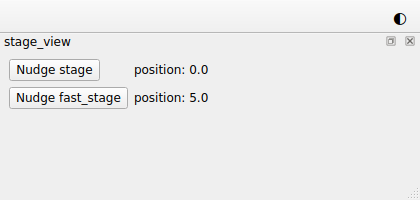
The view has a second row, for fast_stage, which starts at 5.0. Press its
button: fast_stage moves to 5.5, and stage stays where it is.
One presenter and one view now control two stages of different classes, even
though you wrote neither of them for FastStage.
The whole script
"""The session built in the "Describing a device with a protocol" tutorial."""
from __future__ import annotations
from collections.abc import Iterator # noqa: TC003
from functools import cached_property
from typing import Protocol, runtime_checkable
from bluesky.protocols import Reading # noqa: TC002
from ophyd_async.core import (
MovableLogic,
SignalRW,
StandardMovable,
StandardReadable,
soft_signal_rw,
)
from psygnal import Signal
from qtpy.QtWidgets import (
QFormLayout,
QLabel,
QPushButton,
QWidget,
)
from redsun import (
AsDevice,
AsPresenter,
AsView,
DevicesOf,
Link,
Placement,
slot,
)
from redsun.qt import Dock, QtSession
class MyStage(StandardReadable, StandardMovable[float]):
def __init__(self, name: str = "", *, units: str = "mm") -> None:
with self.add_children_as_readables():
self.position = soft_signal_rw(float, units=units)
super().__init__(name=name)
@cached_property
def movable_logic(self) -> MovableLogic[float]:
return MovableLogic(setpoint=self.position, readback=self.position)
class FastStage(StandardReadable, StandardMovable[float]):
def __init__(self, name: str = "", *, units: str = "mm") -> None:
with self.add_children_as_readables():
self.position = soft_signal_rw(float, initial_value=5.0, units=units)
self.speed = soft_signal_rw(float, initial_value=10.0)
super().__init__(name=name)
@cached_property
def movable_logic(self) -> MovableLogic[float]:
return MovableLogic(setpoint=self.position, readback=self.position)
@runtime_checkable
class HasPosition(Protocol):
    position: SignalRW[float]
class StagePresenter:
    def __init__(
        self, name: str, *, stages: DevicesOf[HasPosition], step: float = 1.0
    ) -> None:
        self.name = name
        self.stages = stages
        self.step = step
@slot
async def nudge(self, stage: str) -> None:
position = await self.stages[stage].position.get_value()
await self.stages[stage].position.set(position + self.step)
class StageView(QWidget):
placement: Placement = Dock("left")
sig_nudge = Signal(str)
def __init__(self, name: str, parent: QWidget) -> None:
super().__init__(parent)
self.name = name
self.rows = QFormLayout(self)
self.labels: dict[str, QLabel] = {}
def add_row(self, stage: str) -> None:
button = QPushButton(f"Nudge {stage}")
button.clicked.connect(lambda: self.sig_nudge.emit(stage))
self.labels[stage] = QLabel()
self.rows.addRow(button, self.labels[stage])
@slot
def show_reading(self, reading: dict[str, Reading[float]]) -> None:
for stage, entry in reading.items():
if stage not in self.labels:
self.add_row(stage)
self.labels[stage].setText(f"position: {entry['value']}")
class FirstSession(QtSession):
    config = "session.yaml"
    stage: AsDevice[MyStage]
    fast_stage: AsDevice[FastStage]
    stage_ctrl: AsPresenter[StagePresenter]
    stage_view: AsView[StageView]

    def wire(self) -> Iterator[Link]:
        yield self.stage_view.sig_nudge, self.stage_ctrl.nudge
        yield self.stage.position, self.stage_view.show_reading
        yield self.fast_stage.position, self.stage_view.show_reading


if __name__ == "__main__":
    FirstSession().run()
What you built
You built a session with two stages of different classes, which the presenter and view you already had both show and move. The script also passes the type checker. From now on, each stage you add takes a line in the session and a link, and no new presenter or view.
Next steps
- Building controls for a plan is the next tutorial, where you write a plan and the window gains the controls to run it.
- Questions explains how a component matches a protocol, and how presenters and views are asked for in the same way.
- Write a component has more detail on each kind of component.