Building controls for a plan
In this tutorial you write a plan, and the window gains the controls to run
it: a list of the plans to choose from and, for the plan you choose, a list
of stages, an input for each parameter and a Run button. You don't build
those controls yourself, because redsun builds them from the plan as a
plan widget. It continues from
Describing a device with a protocol.
You write three components. The first offers a
plan, a recipe for an acquisition. The
second runs plans on a RunEngine,
and the third shows the plan widget of the plan you choose. The second and
third never name the first: they ask the session which components offer
plans, and the session answers.
Before you start
What you need
The project folder as you left it, and nothing else.
Open first_session.py, and add these imports below the ones it has:
from collections.abc import Mapping
from typing import Any

import bluesky.plan_stubs as bps
from bluesky.utils import MsgGenerator
from qtpy.QtWidgets import QComboBox, QStackedWidget, QVBoxLayout

from redsun import CallbackType, HasPlans, PlanEntry
from redsun.engine import RunEngine
from redsun.presenter.plan_spec import (
    PlanSpec,
    collect_arguments,
    create_plan_spec,
    resolve_arguments,
)
from redsun.view.qt.utils import PlanWidget, create_plan_widget
Nothing you've written so far changes in this tutorial.
1. Offer a plan
Add a presenter below StageView. It holds a plan called walk, and offers
it to the rest of the session:
class StagePlans:
    def __init__(self, name: str) -> None:
        self.name = name

    def walk(
        self, stage: HasPosition, steps: int = 5, size: float = 1.0
    ) -> MsgGenerator[None]:
        for _ in range(steps):
            position = yield from bps.rd(stage.position)
            yield from bps.mv(stage.position, position + size)

    def plan_map(self) -> Mapping[str, PlanEntry]:
        return {"walk": {"plan": self.walk}}
walk reads where a stage is with bps.rd, moves it
one step further with bps.mv, and repeats. Notice
that it isn't async, because the RunEngine
does the waiting. It takes its stage as a HasPosition, so it works with any
stage of the session.
A component offers plans through plan_map, which returns each plan under
its name as a PlanEntry. Any component with that method
satisfies the protocol HasPlans.
2. Run the plans
Add a second presenter below StagePlans. It has a RunEngine, which it uses
to run the plans the session holds:
class PlanPresenter:
    sig_started = Signal(str)
    sig_finished = Signal()

    def __init__(self, name: str, *, devices: DeviceMapping) -> None:
        self.name = name
        self.devices = devices
        self.engine = RunEngine()
        self.plans: dict[str, PlanEntry] = {}
        self.specs: dict[str, PlanSpec] = {}

    def setup(
        self,
        plan_sources: Mapping[str, HasPlans],
        callbacks: Mapping[str, CallbackType],
    ) -> None:
        for component in plan_sources.values():
            self.plans.update(component.plan_map())
        for plan, entry in self.plans.items():
            self.specs[plan] = create_plan_spec(entry["plan"], self.devices)
        for callback in callbacks.values():
            self.engine.subscribe(callback)

    @slot
    def run(self, plan: str, values: dict[str, Any]) -> None:
        resolved = resolve_arguments(self.specs[plan], values, self.devices)
        args, kwargs = collect_arguments(self.specs[plan], resolved)
        self.sig_started.emit(plan)
        future = self.engine(self.plans[plan]["plan"](*args, **kwargs))
        future.add_done_callback(lambda _: self.sig_finished.emit())
setup runs once every component exists, and the session fills in its
parameters. plan_sources asks for every component that satisfies HasPlans,
so PlanPresenter receives StagePlans without naming it. callbacks asks
for the components that follow a plan while it runs, and the next tutorial
adds one. create_plan_spec
then describes each plan from its signature.
run receives the name of a plan and the values the user chose. Since the
user picks a stage by its name,
resolve_arguments puts the
device in place of the name, and
collect_arguments orders the
values the way the plan takes them. The engine starts the plan without
waiting for it to end, and the presenter sends sig_finished once it has.
3. Build the controls
Add a view below PlanPresenter. It asks the session for the same
components, and builds a plan widget for each plan they offer. It holds all
the widgets, and shows the one for the plan chosen in its list:
class PlanView(QWidget):
    placement: Placement = Dock("right")
    sig_run = Signal(str, dict)

    def __init__(self, name: str, parent: QWidget) -> None:
        super().__init__(parent)
        self.name = name
        self.chooser = QComboBox()
        self.pages = QStackedWidget()
        self.chooser.currentIndexChanged.connect(self.pages.setCurrentIndex)
        layout = QVBoxLayout(self)
        layout.addWidget(self.chooser)
        layout.addWidget(self.pages)
        self.widgets: dict[str, PlanWidget] = {}

    def setup(
        self, plan_sources: Mapping[str, HasPlans], devices: DeviceMapping
    ) -> None:
        for component in plan_sources.values():
            for entry in component.plan_map().values():
                self.add_plan(create_plan_spec(entry["plan"], devices))

    def add_plan(self, spec: PlanSpec) -> None:
        widget = create_plan_widget(
            spec, run_callback=lambda: self.ask_to_run(spec.name)
        )
        self.widgets[spec.name] = widget
        self.chooser.addItem(spec.name)
        self.pages.addWidget(widget.group_box)

    def ask_to_run(self, plan: str) -> None:
        self.setEnabled(False)
        self.sig_run.emit(plan, self.widgets[plan].parameters)

    @slot
    def on_finished(self) -> None:
        self.setEnabled(True)
create_plan_widget builds the
plan widget from the description of the plan. The view disables itself while
a plan runs, and enables itself again when the presenter says the plan has
finished.
redsun also ships a presenter and a view that run any plan, the
acquisition stack. You write your
own here to see how such components work, and because an application may want
to run and show its plans its own way.
4. Add them to the session
Add the highlighted lines:
class FirstSession(QtSession):
    config = "session.yaml"
    stage: AsDevice[MyStage]
    fast_stage: AsDevice[FastStage]
    stage_ctrl: AsPresenter[StagePresenter]
    stage_plans: AsPresenter[StagePlans]
    plan_ctrl: AsPresenter[PlanPresenter]
    stage_view: AsView[StageView]
    plan_view: AsView[PlanView]

    def wire(self) -> Iterator[Link]:
        yield self.stage_view.sig_nudge, self.stage_ctrl.nudge
        yield self.stage.position, self.stage_view.show_reading
        yield self.fast_stage.position, self.stage_view.show_reading
        yield self.plan_view.sig_run, self.plan_ctrl.run
        yield self.plan_ctrl.sig_finished, self.plan_view.on_finished


if __name__ == "__main__":
    FirstSession().run()
No link joins stage_plans to the other two, because the session passes it
to them in setup.
Run the script:
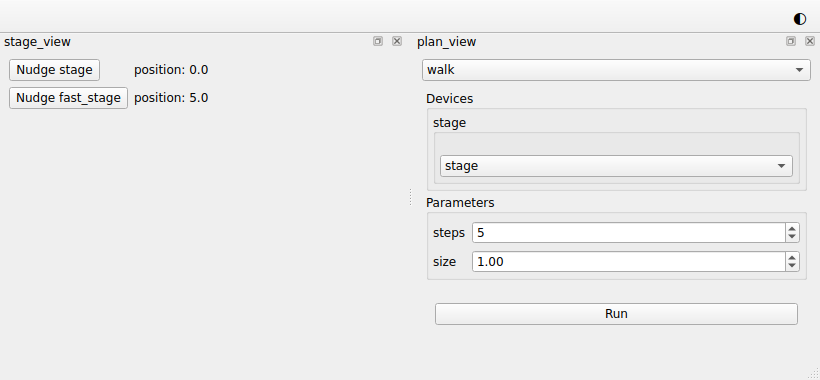
The view on the right starts with the list of the plans, which holds only
walk for now. Below it is the plan widget of walk: a list with the two
stages, an input for steps and one for size with the defaults you wrote,
and a Run button.
The list of stages holds the devices that satisfy HasPosition. Python
checks that while the program runs, which is what runtime_checkable
allowed.
5. Run the plan
Leave stage selected in the list of stages and press Run. The view of
the plans greys out and the position of stage counts up on the left. Then
the view comes back, and the stage has moved five steps of one millimetre,
to 5.0.
walk moves by its own size, since the step in session.yaml only
applies to the buttons of the stages.
If a plan fails, the terminal tells you why, and the view comes back.
6. Change the parameters
Choose fast_stage in the list of stages, set steps to 10 and size to
0.5, and press Run again. This time the position of fast_stage counts
up, by half a millimetre at a time.
You didn't write any code for the list or the inputs, because they follow
the signature of walk.
The whole script
"""The session built in the "Building controls for a plan" tutorial."""

from __future__ import annotations

from collections.abc import Iterator, Mapping  # noqa: TC003
from functools import cached_property
from typing import Any, Protocol, runtime_checkable

import bluesky.plan_stubs as bps
from bluesky.protocols import Reading  # noqa: TC002
from bluesky.utils import MsgGenerator  # noqa: TC002
from ophyd_async.core import (
    MovableLogic,
    SignalRW,
    StandardMovable,
    StandardReadable,
    soft_signal_rw,
)
from psygnal import Signal
from qtpy.QtWidgets import (
    QComboBox,
    QFormLayout,
    QLabel,
    QPushButton,
    QStackedWidget,
    QVBoxLayout,
    QWidget,
)

from redsun import (
    AsDevice,
    AsPresenter,
    AsView,
    CallbackType,
    DeviceMapping,
    DevicesOf,
    HasPlans,
    Link,
    Placement,
    PlanEntry,
    slot,
)
from redsun.engine import RunEngine
from redsun.presenter.plan_spec import (
    PlanSpec,
    collect_arguments,
    create_plan_spec,
    resolve_arguments,
)
from redsun.qt import Dock, QtSession
from redsun.view.qt.utils import PlanWidget, create_plan_widget


class MyStage(StandardReadable, StandardMovable[float]):
    def __init__(self, name: str = "", *, units: str = "mm") -> None:
        with self.add_children_as_readables():
            self.position = soft_signal_rw(float, units=units)
        super().__init__(name=name)

    @cached_property
    def movable_logic(self) -> MovableLogic[float]:
        return MovableLogic(setpoint=self.position, readback=self.position)


class FastStage(StandardReadable, StandardMovable[float]):
    def __init__(self, name: str = "", *, units: str = "mm") -> None:
        with self.add_children_as_readables():
            self.position = soft_signal_rw(float, initial_value=5.0, units=units)
            self.speed = soft_signal_rw(float, initial_value=10.0)
        super().__init__(name=name)

    @cached_property
    def movable_logic(self) -> MovableLogic[float]:
        return MovableLogic(setpoint=self.position, readback=self.position)


@runtime_checkable
class HasPosition(Protocol):
    position: SignalRW[float]


class StagePresenter:
    def __init__(
        self, name: str, *, stages: DevicesOf[HasPosition], step: float = 1.0
    ) -> None:
        self.name = name
        self.stages = stages
        self.step = step

    @slot
    async def nudge(self, stage: str) -> None:
        position = await self.stages[stage].position.get_value()
        await self.stages[stage].position.set(position + self.step)


class StageView(QWidget):
    placement: Placement = Dock("left")
    sig_nudge = Signal(str)

    def __init__(self, name: str, parent: QWidget) -> None:
        super().__init__(parent)
        self.name = name
        self.rows = QFormLayout(self)
        self.labels: dict[str, QLabel] = {}

    def add_row(self, stage: str) -> None:
        button = QPushButton(f"Nudge {stage}")
        button.clicked.connect(lambda: self.sig_nudge.emit(stage))
        self.labels[stage] = QLabel()
        self.rows.addRow(button, self.labels[stage])

    @slot
    def show_reading(self, reading: dict[str, Reading[float]]) -> None:
        for stage, entry in reading.items():
            if stage not in self.labels:
                self.add_row(stage)
            self.labels[stage].setText(f"position: {entry['value']}")


class StagePlans:
    def __init__(self, name: str) -> None:
        self.name = name

    def walk(
        self, stage: HasPosition, steps: int = 5, size: float = 1.0
    ) -> MsgGenerator[None]:
        for _ in range(steps):
            position = yield from bps.rd(stage.position)
            yield from bps.mv(stage.position, position + size)

    def plan_map(self) -> Mapping[str, PlanEntry]:
        return {"walk": {"plan": self.walk}}


class PlanPresenter:
    sig_started = Signal(str)
    sig_finished = Signal()

    def __init__(self, name: str, *, devices: DeviceMapping) -> None:
        self.name = name
        self.devices = devices
        self.engine = RunEngine()
        self.plans: dict[str, PlanEntry] = {}
        self.specs: dict[str, PlanSpec] = {}

    def setup(
        self,
        plan_sources: Mapping[str, HasPlans],
        callbacks: Mapping[str, CallbackType],
    ) -> None:
        for component in plan_sources.values():
            self.plans.update(component.plan_map())
        for plan, entry in self.plans.items():
            self.specs[plan] = create_plan_spec(entry["plan"], self.devices)
        for callback in callbacks.values():
            self.engine.subscribe(callback)

    @slot
    def run(self, plan: str, values: dict[str, Any]) -> None:
        resolved = resolve_arguments(self.specs[plan], values, self.devices)
        args, kwargs = collect_arguments(self.specs[plan], resolved)
        self.sig_started.emit(plan)
        future = self.engine(self.plans[plan]["plan"](*args, **kwargs))
        future.add_done_callback(lambda _: self.sig_finished.emit())


class PlanView(QWidget):
    placement: Placement = Dock("right")
    sig_run = Signal(str, dict)

    def __init__(self, name: str, parent: QWidget) -> None:
        super().__init__(parent)
        self.name = name
        self.chooser = QComboBox()
        self.pages = QStackedWidget()
        self.chooser.currentIndexChanged.connect(self.pages.setCurrentIndex)
        layout = QVBoxLayout(self)
        layout.addWidget(self.chooser)
        layout.addWidget(self.pages)
        self.widgets: dict[str, PlanWidget] = {}

    def setup(
        self, plan_sources: Mapping[str, HasPlans], devices: DeviceMapping
    ) -> None:
        for component in plan_sources.values():
            for entry in component.plan_map().values():
                self.add_plan(create_plan_spec(entry["plan"], devices))

    def add_plan(self, spec: PlanSpec) -> None:
        widget = create_plan_widget(
            spec, run_callback=lambda: self.ask_to_run(spec.name)
        )
        self.widgets[spec.name] = widget
        self.chooser.addItem(spec.name)
        self.pages.addWidget(widget.group_box)

    def ask_to_run(self, plan: str) -> None:
        self.setEnabled(False)
        self.sig_run.emit(plan, self.widgets[plan].parameters)

    @slot
    def on_finished(self) -> None:
        self.setEnabled(True)


class FirstSession(QtSession):
    config = "session.yaml"
    stage: AsDevice[MyStage]
    fast_stage: AsDevice[FastStage]
    stage_ctrl: AsPresenter[StagePresenter]
    stage_plans: AsPresenter[StagePlans]
    plan_ctrl: AsPresenter[PlanPresenter]
    stage_view: AsView[StageView]
    plan_view: AsView[PlanView]

    def wire(self) -> Iterator[Link]:
        yield self.stage_view.sig_nudge, self.stage_ctrl.nudge
        yield self.stage.position, self.stage_view.show_reading
        yield self.fast_stage.position, self.stage_view.show_reading
        yield self.plan_view.sig_run, self.plan_ctrl.run
        yield self.plan_ctrl.sig_finished, self.plan_view.on_finished


if __name__ == "__main__":
    FirstSession().run()
What you built
You built controls that run a plan on the stage you choose, with the number and size of steps you type in. While the plan runs, the window shows the stage moving, and only the view of the plans is greyed out. Any component that offers a plan adds an entry to the list of the plans, with no change to the presenter or the view you wrote here.
Next steps
- Acquiring images is the next tutorial, where you add a camera and a component that offers a plan to acquire with it.
- Questions explains how a component asks the session what it holds.
- How presenters run plans covers plans that run until they are stopped, and actions the user takes while they run.
- How the Qt widgets work lists what a plan widget can hold.