redsun reports what it does as log messages: the components it builds, the
services it starts, and anything that goes wrong. This page shows how to
choose how much of that you see, where it goes, and how to log from your own
code.
All of these messages go through one Python logger, named redsun, which
passes each one on to several places. Step through where a record can go,
and point at a shape to read more:
Where a log record goes
Your components log through the redsun logger, which keeps INFO and above unless you set another level, and prints to the console.
LogView, a built-in Qt view, shows the latest records, those of the build included.
The session log file takes the application's records, from the moment the build reads the configuration until shutdown.
A launched service writes its own log file. The session logs each line the service prints under redsun.service.<name>, which passes it on to the redsun logger.
Handlers you add with add_handler receive the records too, and so does the root logger, because the redsun logger propagates.
Each line on the console starts with the time, the level, and the class and
name of the component that wrote it:
The second line is at DEBUG, so you only see it after lowering the level,
as the next section shows. A line at any level other than INFO also ends
with the file and line of code that wrote it.
Log files describes every part of a line.
A session also writes the records of each run to a file, which it opens when
the build reads the configuration and closes in shutdown(). Each launched
service gets a file of its own. For a session named my-lab with a launched
service camera_ioc, the files look like this:
<root>/logs/my-lab/
|-- app/
|   |-- 2026-09-13T14-02-46_8120.log         the run that started at 14:02:46
|   `-- 2026-09-13T09-15-02_4410.log         an earlier run
`-- services/
    |-- 2026-09-13T14-02-46_8120.camera_ioc.log
    `-- 2026-09-13T09-15-02_4410.camera_ioc.log
<root> is storage.base_dir from the session file, or your user data folder
when that isn't set. Each file name is the time the run started and the id of
its process. Log files gives the data folder on
each platform and how long the files are kept.
session_log returns the handler writing the current
run, and session_log("camera_ioc") returns the one writing that service's
file. The handler's files property lists its files with the oldest records
first.
The session logs a service's output under redsun.service.<service>. A line
that is a JSON log record keeps its level, time and traceback, under
redsun.service.<service>.<its logger>, and any other line, such as a print,
is logged at DEBUG. The session reads two JSON layouts.
After that, the service's logging records reach the session at the level
the session records at. So do its loguru records when loguru is installed.
loguru is a logging library that some service frameworks use in place of
logging: fastcs is one, so a fastcs service's own messages arrive too.
Each record keeps its level, time, logger name and traceback. If you start the
service outside a session, it logs at INFO.
A service not written in Python writes one JSON object per line, in either of
two layouts: the layout of loguru with serialize=True, or an object with the
fields name, levelno, created, msg and exc_text of a
logging.LogRecord.
A service's records follow its logger's level, so
logging.getLogger("redsun.service.camera_ioc").setLevel(logging.INFO) hides
its DEBUG output.
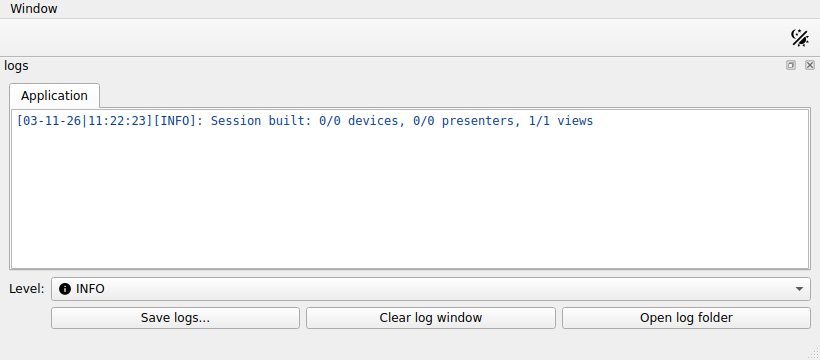
LogView is a built-in Qt view that shows
the session's records. Name it under views in the session file:
views:logs:plugin_name:redsunplugin_id:logs
The view sits at the bottom of the main window and shows every record of the
session, including those from the build, coloured by level. Application records
are on the Application tab, and a Services tab appears once a service
logs something, with a selector for one service or all. The view keeps the
latest 10 000 application records and 2 000 per service, so a noisy service
never pushes application records out. Its controls are:
Control
What it does
Level
shows only records at or above the chosen level, on both tabs; lowering it again brings hidden records back
Save logs...
writes the records of the tab shown to a file you choose, whatever level is shown: the application's, the selected service's, or every service's. It copies the session's log files, so records the view no longer holds are saved too
Clear log window
empties the console of the tab shown; the records stay available to Level and Save logs...
Open log folder
opens the folder holding the session's log files in the system's file browser
Without session log files, as outside a session, Save logs... writes the
records held in memory and Open log folder is disabled.
The session of the picture
A session written in Python declares the view as any other:
When the main window has no room for a dock at the bottom, name
LogWindowAction instead. It adds
a Logs entry to the View menu, and choosing it opens the same log view
in a separate window:
A handler's own level can make a destination quieter than the logger but never
louder, because the logger's level decides which records exist. To write
everything to a file while the console stays at INFO, lower the logger and
raise the console handler.
The redsun logger propagates, so a handler on the root logger also receives
redsun's records. To keep them out, raise redsun's level or stop
propagation:
In a session, redsun never touches the root logger or any logger outside
redsun. configure_logging does, because it sets up all the logging of a
service process.