Writing your first session
In this tutorial you build a small application: a simulated motor stage, a button that moves it, and a label that shows where it is. It needs no hardware, and it continues from Installation.
First you show the stage in a window, and then you make the button move it. Along the way you write one of each of the three kinds of component, and the session that makes them and holds them together.
Before you start
What you need
The project folder of Installation, and nothing else.
In the project folder, make an empty file called first_session.py. Start it
with these imports:
from __future__ import annotations

from collections.abc import Iterator
from functools import cached_property

from bluesky.protocols import Reading
from ophyd_async.core import (
    MovableLogic,
    StandardMovable,
    StandardReadable,
    soft_signal_rw,
)
from psygnal import Signal
from qtpy.QtWidgets import QFormLayout, QLabel, QPushButton, QWidget

from redsun import AsDevice, AsPresenter, AsView, DeviceMapping, Link, Placement, slot
from redsun.qt import Dock, QtSession
1. Write the device
A device describes one piece of your setup, which here is a stage with a position. Since you have no hardware, this stage keeps its position in memory. Add it below the imports:
class MyStage(StandardReadable, StandardMovable[float]):
    def __init__(self, name: str = "", *, units: str = "mm") -> None:
        with self.add_children_as_readables():
            self.position = soft_signal_rw(float, units=units)
        super().__init__(name=name)

    @cached_property
    def movable_logic(self) -> MovableLogic[float]:
        return MovableLogic(setpoint=self.position, readback=self.position)
StandardReadable and
soft_signal_rw come from
ophyd-async, the library redsun
uses for devices. soft_signal_rw makes a
device signal that keeps its value
in memory.
With StandardReadable alone, the stage would only be a value you can read and
write. StandardMovable turns it into
something that moves. Its movable_logic names two signals: the
setpoint, which you write to move the
stage, and the readback, which says
where the stage is. This stage uses one signal for both. In return, the stage
answers the same methods as every motor in ophyd-async:
setmoves it, and finishes when the move does;locatesays where it was sent and where it is;stopstops it, andsubscribefollows its position.
Code that calls those methods, rather than an attribute called position,
works with this stage and with any real motor you put in its place. That
includes bluesky plans that move a device, and the positioner redsun
offers, which the last tutorial uses without changing
the stage.
A movable device reports its readback under its own name. When you read
stage, its position comes back under the key stage, not position.
2. Write the view
A view is what the user of the
application sees and touches. Add this one below the class MyStage. For each stage it hears
from, it draws a row with a button and a label:
class StageView(QWidget):
    placement: Placement = Dock("left")
    sig_nudge = Signal(str)

    def __init__(self, name: str, parent: QWidget) -> None:
        super().__init__(parent)
        self.name = name
        self.rows = QFormLayout(self)
        self.labels: dict[str, QLabel] = {}

    def add_row(self, stage: str) -> None:
        button = QPushButton(f"Nudge {stage}")
        button.clicked.connect(lambda: self.sig_nudge.emit(stage))
        self.labels[stage] = QLabel()
        self.rows.addRow(button, self.labels[stage])

    @slot
    def show_reading(self, reading: dict[str, Reading[float]]) -> None:
        for stage, entry in reading.items():
            if stage not in self.labels:
                self.add_row(stage)
            self.labels[stage].setText(f"position: {entry['value']}")
placement says where the view goes, which here is docked on the left of the
window. sig_nudge is a signal: when you
press a stage's button, the view sends it with the name of that stage.
show_reading is a slot, a method
something else can trigger. It receives a reading: a dictionary whose key is
the name a device reports and whose entry holds the value. For a stage, the
key is the stage's own name, as step 1 explained.
You never call the constructor yourself, because the session does it for
you. The session passes every view its name, and its parent, which is the
main window. Every component stores the name it receives as self.name, as
StageView does.
3. Write the session
Add a session below the view. For now it holds the stage and the view, and sends the position of the stage to the view:
class FirstSession(QtSession):
    stage: AsDevice[MyStage]
    stage_view: AsView[StageView]

    def wire(self) -> Iterator[Link]:
        yield self.stage.position, self.stage_view.show_reading


if __name__ == "__main__":
    FirstSession().run()
Each line in the class body declares a component, with its name on the left
and its layer and class on the right.
wire yields the
links of the session, each one written as
what sends, then the slot that receives.
Run the script:
The terminal tells you what the session built:
In your terminal, the line starts with the time and the word INFO, which
these pages leave out.
A window opens with the view docked on the left:
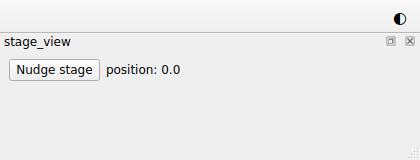
The view has one row, for stage, before you've pressed anything. A link
from a device signal sends the value the signal has when the session makes the
link, and then every new value. So show_reading received the stage's
position while the session started, and added the row for it. Press the
button: nothing happens yet, since nothing listens to it. Close the window.
4. Write the presenter
A presenter holds the application
logic: what the application does, and when. Add this one between the classes MyStage and
StageView. It moves a stage by one step:
class StagePresenter:
    def __init__(self, name: str, *, devices: DeviceMapping, step: float = 1.0) -> None:
        self.name = name
        self.stages = devices
        self.step = step

    @slot
    async def nudge(self, stage: str) -> None:
        position = await self.stages[stage].position.get_value()
        await self.stages[stage].position.set(position + self.step)
The session finds a value for each parameter of the constructor. Because
devices is a DeviceMapping, it receives every
device of the session, by name. Components
explains the rules the session follows.
nudge is a slot that takes the name of a stage. It's async because a
device takes time to answer.
Note
An editor that checks types underlines the two lines of nudge.
devices holds devices of every kind, so the editor can't tell that this
one has a position. The script runs all the same, and
Describing a device with a protocol fixes it.
5. Connect them
Add the highlighted lines to the session. They declare the presenter, and add the link that sends each press of a button to it:
class FirstSession(QtSession):
    stage: AsDevice[MyStage]
    stage_ctrl: AsPresenter[StagePresenter]
    stage_view: AsView[StageView]

    def wire(self) -> Iterator[Link]:
        yield self.stage_view.sig_nudge, self.stage_ctrl.nudge
        yield self.stage.position, self.stage_view.show_reading


if __name__ == "__main__":
    FirstSession().run()
The view knows nothing about the presenter, and the presenter knows nothing
about the view, so it's the session that joins them. A presenter and a view
written to work together like this are called a
stack, and the last tutorial swaps this
one for a stack redsun ships.
Run the script again:
Press the button: the position counts up by one each time.
6. Change a setting without touching the code
Make a file called session.yaml in the project folder, beside the script:
The first line gives the session a name, and the rest gives a value to the
step parameter of the stage_ctrl component.
To tell the session to read the file, add this line to the class
FirstSession, as its first line:
Run the script again. Each press now moves the stage by 0.5, because the
session found step in the file and passed it to the presenter's
constructor.
The session looks for the file in the folder you run the command from, which is the project folder. Keep both the file and the line, since the next tutorials count on them.
The whole script
The script leaves out the config line of step 6.
"""The session built in the "Writing your first session" tutorial."""

from __future__ import annotations

from collections.abc import Iterator  # noqa: TC003
from functools import cached_property

from bluesky.protocols import Reading  # noqa: TC002
from ophyd_async.core import (
    MovableLogic,
    StandardMovable,
    StandardReadable,
    soft_signal_rw,
)
from psygnal import Signal
from qtpy.QtWidgets import (
    QFormLayout,
    QLabel,
    QPushButton,
    QWidget,
)

from redsun import (
    AsDevice,
    AsPresenter,
    AsView,
    DeviceMapping,
    Link,
    Placement,
    slot,
)
from redsun.qt import Dock, QtSession


class MyStage(StandardReadable, StandardMovable[float]):
    def __init__(self, name: str = "", *, units: str = "mm") -> None:
        with self.add_children_as_readables():
            self.position = soft_signal_rw(float, units=units)
        super().__init__(name=name)

    @cached_property
    def movable_logic(self) -> MovableLogic[float]:
        return MovableLogic(setpoint=self.position, readback=self.position)


class StagePresenter:
    def __init__(self, name: str, *, devices: DeviceMapping, step: float = 1.0) -> None:
        self.name = name
        self.stages = devices
        self.step = step

    @slot
    async def nudge(self, stage: str) -> None:
        position = await self.stages[stage].position.get_value()
        await self.stages[stage].position.set(position + self.step)


class StageView(QWidget):
    placement: Placement = Dock("left")
    sig_nudge = Signal(str)

    def __init__(self, name: str, parent: QWidget) -> None:
        super().__init__(parent)
        self.name = name
        self.rows = QFormLayout(self)
        self.labels: dict[str, QLabel] = {}

    def add_row(self, stage: str) -> None:
        button = QPushButton(f"Nudge {stage}")
        button.clicked.connect(lambda: self.sig_nudge.emit(stage))
        self.labels[stage] = QLabel()
        self.rows.addRow(button, self.labels[stage])

    @slot
    def show_reading(self, reading: dict[str, Reading[float]]) -> None:
        for stage, entry in reading.items():
            if stage not in self.labels:
                self.add_row(stage)
            self.labels[stage].setText(f"position: {entry['value']}")


class FirstSession(QtSession):
    stage: AsDevice[MyStage]
    stage_ctrl: AsPresenter[StagePresenter]
    stage_view: AsView[StageView]

    def wire(self) -> Iterator[Link]:
        yield self.stage_view.sig_nudge, self.stage_ctrl.nudge
        yield self.stage.position, self.stage_view.show_reading


if __name__ == "__main__":
    FirstSession().run()
What you built
You built a window that shows a simulated stage and moves it. It's made of a device, a presenter and a view, which a session built and connected for you. The size of each step comes from a file you can change without opening the script.
Next steps
- Describing a device with a protocol is the next tutorial, where you add a second stage that the same presenter and view control.
- Write a component has more detail on each kind of component.
- Sessions explains what happens when a session builds.
- Write a session file lists everything a file can say.