How to move devices by hand
redsun comes with a built-in positioner that you can add to a session to move
your devices by hand. Its presenter moves
their axes, and its view has a row per axis, where you step the axis, send it
to a position, stop it and change its settings. ADR
20 explains the
design.
Prerequisites
You need devices whose moving parts are ophyd-async movables, such as a
StandardMovable or an EPICS Motor. The Python blocks below are parts of one
script, and the whole script is at the end.
How the positioner finds axes
The positioner looks inside every device for its axes. An axis is a piece of a
device that set moves, locate reports and subscribe follows, which means
it satisfies AsyncLocatable from ophyd-async and Subscribable from
bluesky, and it isn't a signal. The search stops at each axis it finds, so
the signals of an axis never show up as axes. A device that is itself movable
is its own single axis.
The view shows each axis under its attribute name, or under its dotted path,
such as left.x, when two axes of one device share a name. This stage has two
axes, x and y:
class MyAxis(StandardReadable, StandardMovable[float]):
    def __init__(self, name: str = "") -> None:
        with self.add_children_as_readables(StandardReadableFormat.HINTED_SIGNAL):
            self.position = soft_signal_rw(float, 0.0, units="um", precision=2)
        with self.add_children_as_readables(StandardReadableFormat.CONFIG_SIGNAL):
            self.velocity = soft_signal_rw(float, 100.0, units="um/s")
        super().__init__(name=name)

    @cached_property
    def movable_logic(self) -> MovableLogic[float]:
        return MovableLogic(setpoint=self.position, readback=self.position)


class MyStage(StandardReadable):
    def __init__(self, name: str = "") -> None:
        self.axis = DeviceMap({"x": MyAxis(), "y": MyAxis()})
        self.add_readables(list(self.axis.values()))
        super().__init__(name=name)
The positioner finds axes by what they can do, never by their names, so the
view makes no assumption about which axis is which.
find_axes returns what the positioner finds
for a device.
When the positioner is built, it describes and follows every axis. It leaves
out, with a warning, an axis whose position is not a number, whose
configuration can't be read, or that doesn't answer within timeout seconds
(10 by default), and it keeps the other axes.
Declare the positioner in a session file
Both components are built into redsun, under the plugin id positioner.
Declare them and pair them:
presenters:
  positioner:
    plugin_name: redsun
    plugin_id: positioner
views:
  positioner_view:
    plugin_name: redsun
    plugin_id: positioner
    repeat_interval: 50
pairs:
  - [positioner_view, positioner]
The pairing makes the nine links between the two. Written out, they are:
The same links under wiring
wiring:
  positioner_view.sig_move: positioner.move
  positioner_view.sig_move_to: positioner.move_to
  positioner_view.sig_stop_device: positioner.stop
  positioner_view.sig_configure: positioner.configure
  positioner.sig_readback: positioner_view.update_readback
  positioner.sig_moving: positioner_view.set_moving
  positioner.sig_failed: positioner_view.set_failed
  positioner.sig_limits: positioner_view.update_limits
  positioner.sig_configuration: positioner_view.update_configuration
The presenter takes every device with at least one axis. To show only some of
them, list them under include. A name that isn't a device of the session
gets a warning:
The view takes these keywords:
repeat_delay: the milliseconds a step button is held before it repeats (400 by default).repeat_interval: the milliseconds between two repeated steps (50 by default). Once you set a repeat interval in the Advanced tab, it replacesrepeat_intervalin later sessions.steps: the step sizes offered for each axis (0.001to1000by decades).step_box:combobox(the default) lists those sizes, andspinboxtakes any size from the smallest to the largest, its arrows moving it by decades.undo_delay: the milliseconds Undo is offered after a saved position is removed (5000 by default).
A second positioner presenter stops the view from building
The view asks for the presenter in setup, and two presenters would leave
it with two answers. Declare one presenter and use include to choose its
devices.
Declare it in Python
The same pairing, from wire():
A plan that locks a device disables that device's controls while it runs,
Stop and its configuration included. The presenter also refuses moves and
configuration writes for it, a go-to already waiting included. To stop the
device, stop the plan, because the engine stops every device the plan moved.
The engine isn't a session component, so you make these links in wire(), from
the presenter that holds the engine:
yield self.ctrl.engine.sig_locks_changed, self.positioner_view.set_locked
yield self.ctrl.engine.sig_locks_changed, self.positioner.set_locked
With the built-in acquisition stack, pairing its presenter with the view,
- [acquisition, positioner_view], makes the view's link, and pairing it
with the presenter, - [acquisition, positioner], makes the presenter's.
Run plans from the window
shows how.
Use the view
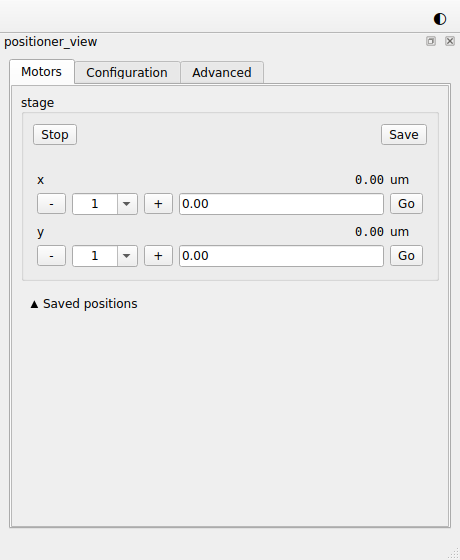
- The Motors tab has a group per device and a row per axis.
-and+step the axis by the size chosen beside them, and repeat while you hold them. With the row or a step button focused, Left and Right do the same. A step starts from the setpoint, so steps add up exactly, and from the readback after a stop or a failure. - The field beside
Goshows where the axis is until you type a target. Enter orGosends the axis there. The view doesn't send a target that is not a number or that falls outside the limits the device reports, and the group says why. The limits are read again after each configuration write and after a move that is refused or fails, so a changed offset moves them too. An axis that checks its own targets, as anophyd-asyncStandardMovabledoes, also refuses a target outside its current limits when it moves. Stopappears for a device that can be stopped, and stops the device and each of its axes at once. If one of them fails to stop, it is reported and the rest still stop.- "moving" and "failed" show the state of each device, with the error after "failed".
Savekeeps where a device stands, under a name you can edit, in the Saved positions section.Goon an entry moves that device back there, after the same checks as a typed target. A saved position also keeps the configuration values in the units of the axis' position, such as an offset. If one has changed since, the firstGonames it and the second moves.xremoves an entry, and for a few seconds after,Undobrings it back.- The Configuration tab shows each axis' configuration, such as
velocity, and writes the entries that can be written. A value changed on the device by anything else is shown as it changes. - The Advanced tab sets the repeat interval, between 10 and 300 ms.
The session's Settings keep saved positions and the
repeat interval, in one file per session on each machine, under keys named
after the view. If you rename the view in the session file, it starts with
none.
Show a setting a device does not declare
The Configuration tab shows what each axis returns from
describe_configuration(), so it doesn't show a signal the axis doesn't
declare as configuration, such as the acceleration of an EPICS motor record. To
show it, declare it StandardReadableFormat.CONFIG_SIGNAL in a subclass of the
axis' class.
Customize the positioner
Change what a move does
The presenter is a dataclass, so subclass it as one, with eq=False as the
base has, and kw_only=True so that your fields are keyword arguments like the
base's devices and include. Every target, of a step or a go-to, passes
check before it is sent, so to
refuse more targets, override check and call super().check first:
@dataclass(eq=False, kw_only=True)
class KeepOutPositioner(PositionerPresenter):
    keep_out: dict[str, tuple[float, float]] = field(default_factory=dict)

    def check(self, device: str, axis: str, target: float) -> None:
        super().check(device, axis, target)
        zone = self.keep_out.get(f"{device}.{axis}")
        if zone is not None and zone[0] <= target <= zone[1]:
            raise ValueError(f"{axis} {target} is in a keep-out zone")
The new field is set like any other constructor keyword:
positioner: Annotated[
    AsPresenter[KeepOutPositioner], Declare(keep_out={"stage.x": (40.0, 60.0)})
]
positioner_view: AsView[MyPositionerView]
Override check, the slots move, move_to, stop, configure and
set_locked, and the properties axes and configuration, calling super().
Methods with a leading underscore may change.
An overridden slot needs slot again
A slot you override loses its marking. Mark it with slot
again.
Change the view
group_class is the
widget built for each device, and
tabs holds the Motors,
Configuration and Advanced tabs. A subclass can replace the first and add to
the second:
class HomingGroup(PositionerGroup):
    def __init__(self, *args: Any, **kwargs: Any) -> None:
        super().__init__(*args, **kwargs)
        self.home = QPushButton("Home", self)
        layout = self.layout()
        if layout is not None:
            layout.addWidget(self.home)


class MyPositionerView(PositionerView):
    group_class = HomingGroup

    def setup(self, positioner: DescribesAxes, settings: Settings) -> None:
        super().setup(positioner, settings)
        self.tabs.addTab(QLabel("Notes about this stage."), "Notes")
A subclass can also set its own placement, or override a slot such as
set_failed, marked with slot again.
Replace one half
The links above, and the
DescribesAxes protocol the view asks for
in setup, are the whole contract between the two components. A presenter of
your own with the same slots, signals, axes and configuration properties
works with the built-in view, and a view of your own works with the built-in
presenter.
PositionerGroup is the group of
one device, ready to place in a view of your own, and the helpers of
redsun.utils.devices read the axes, limits and
configuration of any device.
The customized session in full
"""The customized session of the guide "How to move devices by hand"."""

from __future__ import annotations

from collections.abc import Iterator  # noqa: TC003
from dataclasses import dataclass, field
from functools import cached_property
from typing import Annotated, Any, ClassVar

from ophyd_async.core import (
    DeviceMap,
    MovableLogic,
    StandardMovable,
    StandardReadable,
    StandardReadableFormat,
    soft_signal_rw,
)
from qtpy.QtWidgets import QLabel, QPushButton

from redsun import (
    AsDevice,
    AsPresenter,
    AsView,
    Declare,
    Link,
    Settings,
    links_between,
)
from redsun.presenter import (
    DescribesAxes,
    PositionerPresenter,
)
from redsun.qt import QtSession
from redsun.view.qt.builtins import PositionerGroup, PositionerView


class MyAxis(StandardReadable, StandardMovable[float]):
    def __init__(self, name: str = "") -> None:
        with self.add_children_as_readables(StandardReadableFormat.HINTED_SIGNAL):
            self.position = soft_signal_rw(float, 0.0, units="um", precision=2)
        with self.add_children_as_readables(StandardReadableFormat.CONFIG_SIGNAL):
            self.velocity = soft_signal_rw(float, 100.0, units="um/s")
        super().__init__(name=name)

    @cached_property
    def movable_logic(self) -> MovableLogic[float]:
        return MovableLogic(setpoint=self.position, readback=self.position)


class MyStage(StandardReadable):
    def __init__(self, name: str = "") -> None:
        self.axis = DeviceMap({"x": MyAxis(), "y": MyAxis()})
        self.add_readables(list(self.axis.values()))
        super().__init__(name=name)


@dataclass(eq=False, kw_only=True)
class KeepOutPositioner(PositionerPresenter):
    keep_out: dict[str, tuple[float, float]] = field(default_factory=dict)

    def check(self, device: str, axis: str, target: float) -> None:
        super().check(device, axis, target)
        zone = self.keep_out.get(f"{device}.{axis}")
        if zone is not None and zone[0] <= target <= zone[1]:
            raise ValueError(f"{axis} {target} is in a keep-out zone")


class HomingGroup(PositionerGroup):
    def __init__(self, *args: Any, **kwargs: Any) -> None:
        super().__init__(*args, **kwargs)
        self.home = QPushButton("Home", self)
        layout = self.layout()
        if layout is not None:
            layout.addWidget(self.home)


class MyPositionerView(PositionerView):
    group_class = HomingGroup

    def setup(self, positioner: DescribesAxes, settings: Settings) -> None:
        super().setup(positioner, settings)
        self.tabs.addTab(QLabel("Notes about this stage."), "Notes")


class MyApp(QtSession):
    config: ClassVar[dict[str, Any]] = {"session": "my-lab"}

    stage: AsDevice[MyStage]
    positioner: Annotated[
        AsPresenter[KeepOutPositioner], Declare(keep_out={"stage.x": (40.0, 60.0)})
    ]
    positioner_view: AsView[MyPositionerView]

    def wire(self) -> Iterator[Link]:
        yield from links_between(self.positioner_view, self.positioner)
The example in full
The whole script
"""The session of the guide "How to move devices by hand"."""

from __future__ import annotations

from collections.abc import Iterator  # noqa: TC003
from functools import cached_property
from typing import Any, ClassVar

from ophyd_async.core import (
    DeviceMap,
    MovableLogic,
    StandardMovable,
    StandardReadable,
    StandardReadableFormat,
    soft_signal_rw,
)

from redsun import AsDevice, AsPresenter, AsView, Link, links_between
from redsun.engine import RunEngine
from redsun.presenter import PositionerPresenter  # noqa: TC001
from redsun.qt import QtSession
from redsun.view.qt.builtins import PositionerView  # noqa: TC001


class MyAxis(StandardReadable, StandardMovable[float]):
    def __init__(self, name: str = "") -> None:
        with self.add_children_as_readables(StandardReadableFormat.HINTED_SIGNAL):
            self.position = soft_signal_rw(float, 0.0, units="um", precision=2)
        with self.add_children_as_readables(StandardReadableFormat.CONFIG_SIGNAL):
            self.velocity = soft_signal_rw(float, 100.0, units="um/s")
        super().__init__(name=name)

    @cached_property
    def movable_logic(self) -> MovableLogic[float]:
        return MovableLogic(setpoint=self.position, readback=self.position)


class MyStage(StandardReadable):
    def __init__(self, name: str = "") -> None:
        self.axis = DeviceMap({"x": MyAxis(), "y": MyAxis()})
        self.add_readables(list(self.axis.values()))
        super().__init__(name=name)


class MyController:
    def __init__(self, name: str) -> None:
        self.name = name
        self.engine = RunEngine()


class MyApp(QtSession):
    config: ClassVar[dict[str, Any]] = {"session": "my-lab"}

    stage: AsDevice[MyStage]
    ctrl: AsPresenter[MyController]
    positioner: AsPresenter[PositionerPresenter]
    positioner_view: AsView[PositionerView]

    def wire(self) -> Iterator[Link]:
        yield from links_between(self.positioner_view, self.positioner)
        yield self.ctrl.engine.sig_locks_changed, self.positioner_view.set_locked
        yield self.ctrl.engine.sig_locks_changed, self.positioner.set_locked


if __name__ == "__main__":
    MyApp().run()