Acquiring images
In this tutorial you add a camera to the session, and a presenter that offers a plan to acquire with it. You then find the frames on disk, and show the last one in the window. It continues from Building controls for a plan.
The camera is a simulated one that ships with
ophyd-async, so you need no
hardware and don't write a device. The presenter and the view of the plans
stay as they are, because the session passes them the new plan.
Before you start
What you need
h5py, which the camera uses to write its file and the session uses to
read it. It doesn't come with redsun:
h5py comes without information on its types, and mypy reports that
as an error. If you keep checking the types of the script, add these
lines to pyproject.toml first:
Open first_session.py, and add these imports below the ones it has:
from urllib.parse import urlsplit
from urllib.request import url2pathname

import bluesky.plans as bp
import h5py
import numpy as np
from bluesky.protocols import Readable, Triggerable
from event_model import DocumentRouter, StreamResource
from ophyd_async.sim import SimBlobDetector
from qtpy.QtGui import QImage, QPixmap
Nothing you've written so far changes in this tutorial either.
1. Say what a camera is
Like walk, the new plan says what it needs from a device with a protocol.
Add a second protocol below HasPosition:
A camera is a device you can read, and trigger to take a frame. Both
protocols come from bluesky. You can
read the stages but not trigger them, so they aren't cameras.
2. Offer a plan for it
Add a presenter below PlanView:
class CameraPresenter(DocumentRouter):
sig_frame = Signal(object)
def __init__(self, name: str, *, cameras: DevicesOf[Camera]) -> None:
super().__init__()
self.name = name
self.cameras = cameras
self.written: tuple[str, str] | None = None
def snap(self, camera: Camera, frames: int = 3) -> MsgGenerator[Any]:
return (yield from bp.count([camera], num=frames))
def plan_map(self) -> Mapping[str, PlanEntry]:
return {"snap": {"plan": self.snap}}
def stream_resource(self, doc: StreamResource) -> StreamResource:
if doc["data_key"] in self.cameras:
self.written = (doc["uri"], doc["parameters"]["dataset"])
return doc
@slot
def show_last(self) -> None:
if self.written is not None:
uri, dataset = self.written
with h5py.File(url2pathname(urlsplit(uri).path), "r") as file:
self.sig_frame.emit(file[dataset][-1])
self.written = None
It offers a plan, as StagePlans does. The plan, snap, wraps
count, a plan bluesky already has.
The presenter also follows the plan as it goes. The
RunEngine emits
documents, records of what happens,
and a DocumentRouter such as this presenter gets each kind in a method of
the same name. This one handles
StreamResource, which a device
emits to say which file it wrote. The camera emits two in a run, and the one
named camera holds its frames. Once the plan has ended,
show_last turns the URI of that file into a path with the two functions of
urllib, opens the file, and sends the last frame with sig_frame.
3. Run it
Add these two lines to the session, the first among the devices and the second among the presenters. A device someone else already wrote needs no code from you, only its line:
Run the script:
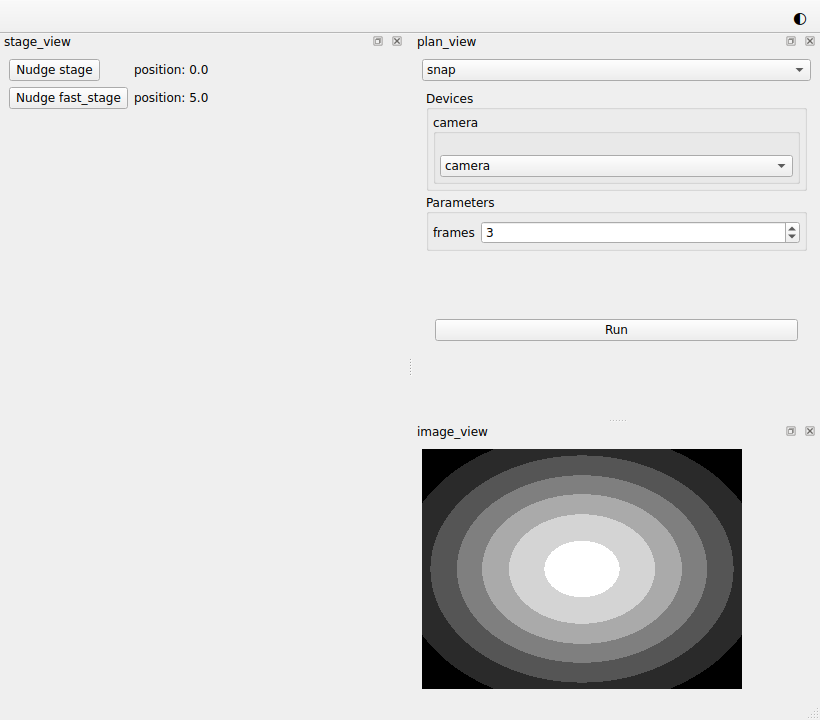
The list of the plans has a second entry, snap. Choose it, and the view
shows the plan widget of snap, with a list that holds camera and an input
for frames. You didn't connect anything. Because CameraPresenter offers a
plan, the session passed it to PlanPresenter and to PlanView. Because
it's also a DocumentRouter, the session passed it to PlanPresenter a
second time, among callbacks.
Press Run: the view greys out and comes back. The camera acquires the frames, but nothing shows them yet. Close the window.
4. Show the frame
Add a view below CameraPresenter:
class ImageView(QWidget):
placement: Placement = Dock("right")
def __init__(self, name: str, parent: QWidget) -> None:
super().__init__(parent)
self.name = name
self.image = QLabel("No image yet")
QVBoxLayout(self).addWidget(self.image)
@slot
def show_frame(self, frame: object) -> None:
values = np.asarray(frame, dtype=float)
low, high = values.min(), values.max()
grey = (255 * (values - low) / max(high - low, 1.0)).astype(np.uint8)
height, width = grey.shape
image = QImage(
grey.tobytes(), width, height, width, QImage.Format.Format_Grayscale8
)
self.image.setPixmap(QPixmap.fromImage(image.copy()))
show_frame turns the frame into an image. Since the camera writes small
numbers, it first stretches the values over the whole scale of greys.
5. Add it to the session
Add the highlighted lines. You already added the first two in step 3:
class FirstSession(QtSession):
config = "session.yaml"
stage: AsDevice[MyStage]
fast_stage: AsDevice[FastStage]
camera: AsDevice[SimBlobDetector]
stage_ctrl: AsPresenter[StagePresenter]
stage_plans: AsPresenter[StagePlans]
plan_ctrl: AsPresenter[PlanPresenter]
camera_ctrl: AsPresenter[CameraPresenter]
stage_view: AsView[StageView]
plan_view: AsView[PlanView]
image_view: AsView[ImageView]
def wire(self) -> Iterator[Link]:
yield self.stage_view.sig_nudge, self.stage_ctrl.nudge
yield self.stage.position, self.stage_view.show_reading
yield self.fast_stage.position, self.stage_view.show_reading
yield self.plan_view.sig_run, self.plan_ctrl.run
yield self.plan_ctrl.sig_finished, self.plan_view.on_finished
yield self.plan_ctrl.sig_started, self.path_provider.set_plan
yield self.plan_ctrl.sig_finished, self.path_provider.reset_plan
yield self.plan_ctrl.sig_finished, self.camera_ctrl.show_last
yield self.camera_ctrl.sig_frame, self.image_view.show_frame
if __name__ == "__main__":
FirstSession().run()
The first two new links reach the
path provider of the session,
self.path_provider, which tells the camera
where to write.
set_plan gives the
path provider the name of the plan that's about to run, and
reset_plan clears it
afterwards.
6. Acquire
Choose snap in the list of the plans and press Run. After a moment the
last frame appears:
7. Find the files
The frames are in the folder redsun keeps for you, in folders named after
the session and the date:
redsun/
`-- first-session/ the name session.yaml gives the session
`-- 2026-09-28/ the day of the acquisition
`-- camera/
`-- snap_00000.h5
| Platform | Where redsun/ is |
|---|---|
| Windows | %LOCALAPPDATA%\redsun |
| macOS | ~/Library/Application Support/redsun |
| Linux | ~/.local/share/redsun |
Open the folder, then press Run again: snap_00001.h5 appears beside the
first. The files are named after the plan. The file from step 3 is
there too, as unknown_00000.h5, because nothing had told the path provider
the name of the plan yet.
The session chose the folder and the name, and created the folder. The camera
wrote the file, in a format it chose. redsun itself writes no acquisition
data.
The whole script
"""The session built in the "Acquiring images" tutorial."""
from __future__ import annotations
from collections.abc import Iterator, Mapping # noqa: TC003
from functools import cached_property
from typing import Any, Protocol, runtime_checkable
from urllib.parse import urlsplit
from urllib.request import url2pathname
import bluesky.plan_stubs as bps
import bluesky.plans as bp
import h5py
import numpy as np
from bluesky.protocols import Readable, Reading, Triggerable
from bluesky.utils import MsgGenerator # noqa: TC002
from event_model import DocumentRouter, StreamResource
from ophyd_async.core import (
MovableLogic,
SignalRW,
StandardMovable,
StandardReadable,
soft_signal_rw,
)
from ophyd_async.sim import SimBlobDetector # noqa: TC002
from psygnal import Signal
from qtpy.QtGui import QImage, QPixmap
from qtpy.QtWidgets import (
QComboBox,
QFormLayout,
QLabel,
QPushButton,
QStackedWidget,
QVBoxLayout,
QWidget,
)
from redsun import (
AsDevice,
AsPresenter,
AsView,
CallbackType,
DeviceMapping,
DevicesOf,
HasPlans,
Link,
Placement,
PlanEntry,
slot,
)
from redsun.engine import RunEngine
from redsun.presenter.plan_spec import (
PlanSpec,
collect_arguments,
create_plan_spec,
resolve_arguments,
)
from redsun.qt import Dock, QtSession
from redsun.view.qt.utils import PlanWidget, create_plan_widget
class MyStage(StandardReadable, StandardMovable[float]):
def __init__(self, name: str = "", *, units: str = "mm") -> None:
with self.add_children_as_readables():
self.position = soft_signal_rw(float, units=units)
super().__init__(name=name)
@cached_property
def movable_logic(self) -> MovableLogic[float]:
return MovableLogic(setpoint=self.position, readback=self.position)
class FastStage(StandardReadable, StandardMovable[float]):
def __init__(self, name: str = "", *, units: str = "mm") -> None:
with self.add_children_as_readables():
self.position = soft_signal_rw(float, initial_value=5.0, units=units)
self.speed = soft_signal_rw(float, initial_value=10.0)
super().__init__(name=name)
@cached_property
def movable_logic(self) -> MovableLogic[float]:
return MovableLogic(setpoint=self.position, readback=self.position)
@runtime_checkable
class HasPosition(Protocol):
position: SignalRW[float]
@runtime_checkable
class Camera(Readable[Any], Triggerable, Protocol): ...
class StagePresenter:
def __init__(
self, name: str, *, stages: DevicesOf[HasPosition], step: float = 1.0
) -> None:
self.name = name
self.stages = stages
self.step = step
@slot
async def nudge(self, stage: str) -> None:
position = await self.stages[stage].position.get_value()
await self.stages[stage].position.set(position + self.step)
class StageView(QWidget):
placement: Placement = Dock("left")
sig_nudge = Signal(str)
def __init__(self, name: str, parent: QWidget) -> None:
super().__init__(parent)
self.name = name
self.rows = QFormLayout(self)
self.labels: dict[str, QLabel] = {}
def add_row(self, stage: str) -> None:
button = QPushButton(f"Nudge {stage}")
button.clicked.connect(lambda: self.sig_nudge.emit(stage))
self.labels[stage] = QLabel()
self.rows.addRow(button, self.labels[stage])
@slot
def show_reading(self, reading: dict[str, Reading[float]]) -> None:
for stage, entry in reading.items():
if stage not in self.labels:
self.add_row(stage)
self.labels[stage].setText(f"position: {entry['value']}")
class StagePlans:
def __init__(self, name: str) -> None:
self.name = name
def walk(
self, stage: HasPosition, steps: int = 5, size: float = 1.0
) -> MsgGenerator[None]:
for _ in range(steps):
position = yield from bps.rd(stage.position)
yield from bps.mv(stage.position, position + size)
def plan_map(self) -> Mapping[str, PlanEntry]:
return {"walk": {"plan": self.walk}}
class PlanPresenter:
sig_started = Signal(str)
sig_finished = Signal()
def __init__(self, name: str, *, devices: DeviceMapping) -> None:
self.name = name
self.devices = devices
self.engine = RunEngine()
self.plans: dict[str, PlanEntry] = {}
self.specs: dict[str, PlanSpec] = {}
def setup(
self,
plan_sources: Mapping[str, HasPlans],
callbacks: Mapping[str, CallbackType],
) -> None:
for component in plan_sources.values():
self.plans.update(component.plan_map())
for plan, entry in self.plans.items():
self.specs[plan] = create_plan_spec(entry["plan"], self.devices)
for callback in callbacks.values():
self.engine.subscribe(callback)
@slot
def run(self, plan: str, values: dict[str, Any]) -> None:
resolved = resolve_arguments(self.specs[plan], values, self.devices)
args, kwargs = collect_arguments(self.specs[plan], resolved)
self.sig_started.emit(plan)
future = self.engine(self.plans[plan]["plan"](*args, **kwargs))
future.add_done_callback(lambda _: self.sig_finished.emit())
class PlanView(QWidget):
placement: Placement = Dock("right")
sig_run = Signal(str, dict)
def __init__(self, name: str, parent: QWidget) -> None:
super().__init__(parent)
self.name = name
self.chooser = QComboBox()
self.pages = QStackedWidget()
self.chooser.currentIndexChanged.connect(self.pages.setCurrentIndex)
layout = QVBoxLayout(self)
layout.addWidget(self.chooser)
layout.addWidget(self.pages)
self.widgets: dict[str, PlanWidget] = {}
def setup(
self, plan_sources: Mapping[str, HasPlans], devices: DeviceMapping
) -> None:
for component in plan_sources.values():
for entry in component.plan_map().values():
self.add_plan(create_plan_spec(entry["plan"], devices))
def add_plan(self, spec: PlanSpec) -> None:
widget = create_plan_widget(
spec, run_callback=lambda: self.ask_to_run(spec.name)
)
self.widgets[spec.name] = widget
self.chooser.addItem(spec.name)
self.pages.addWidget(widget.group_box)
def ask_to_run(self, plan: str) -> None:
self.setEnabled(False)
self.sig_run.emit(plan, self.widgets[plan].parameters)
@slot
def on_finished(self) -> None:
self.setEnabled(True)
class CameraPresenter(DocumentRouter):
    sig_frame = Signal(object)

    def __init__(self, name: str, *, cameras: DevicesOf[Camera]) -> None:
        super().__init__()
        self.name = name
        self.cameras = cameras
        self.written: tuple[str, str] | None = None

    def snap(self, camera: Camera, frames: int = 3) -> MsgGenerator[Any]:
        return (yield from bp.count([camera], num=frames))

    def plan_map(self) -> Mapping[str, PlanEntry]:
        return {"snap": {"plan": self.snap}}

    def stream_resource(self, doc: StreamResource) -> StreamResource:
        if doc["data_key"] in self.cameras:
            self.written = (doc["uri"], doc["parameters"]["dataset"])
        return doc

    @slot
    def show_last(self) -> None:
        if self.written is not None:
            uri, dataset = self.written
            with h5py.File(url2pathname(urlsplit(uri).path), "r") as file:
                self.sig_frame.emit(file[dataset][-1])
            self.written = None
class ImageView(QWidget):
    placement: Placement = Dock("right")

    def __init__(self, name: str, parent: QWidget) -> None:
        super().__init__(parent)
        self.name = name
        self.image = QLabel("No image yet")
        QVBoxLayout(self).addWidget(self.image)

    @slot
    def show_frame(self, frame: object) -> None:
        values = np.asarray(frame, dtype=float)
        low, high = values.min(), values.max()
        grey = (255 * (values - low) / max(high - low, 1.0)).astype(np.uint8)
        height, width = grey.shape
        image = QImage(
            grey.tobytes(), width, height, width, QImage.Format.Format_Grayscale8
        )
        self.image.setPixmap(QPixmap.fromImage(image.copy()))
class FirstSession(QtSession):
    config = "session.yaml"
    stage: AsDevice[MyStage]
    fast_stage: AsDevice[FastStage]
    camera: AsDevice[SimBlobDetector]
    stage_ctrl: AsPresenter[StagePresenter]
    stage_plans: AsPresenter[StagePlans]
    plan_ctrl: AsPresenter[PlanPresenter]
    camera_ctrl: AsPresenter[CameraPresenter]
    stage_view: AsView[StageView]
    plan_view: AsView[PlanView]
    image_view: AsView[ImageView]

    def wire(self) -> Iterator[Link]:
        yield self.stage_view.sig_nudge, self.stage_ctrl.nudge
        yield self.stage.position, self.stage_view.show_reading
        yield self.fast_stage.position, self.stage_view.show_reading
        yield self.plan_view.sig_run, self.plan_ctrl.run
        yield self.plan_ctrl.sig_finished, self.plan_view.on_finished
        yield self.plan_ctrl.sig_started, self.path_provider.set_plan
        yield self.plan_ctrl.sig_finished, self.path_provider.reset_plan
        yield self.plan_ctrl.sig_finished, self.camera_ctrl.show_last
        yield self.camera_ctrl.sig_frame, self.image_view.show_frame


if __name__ == "__main__":
    FirstSession().run()
What you built
You added a camera beside the two stages, and a second plan to choose in the
view of the plans. Its plan widget acquires as many frames as you ask for,
and the last one shows in the window. Every acquisition is a file of its own
on disk, in a folder named after the session and the day. The plan reached
its widget and the RunEngine without a line of yours joining them.
Next steps
- Scanning a stage with the camera is the next tutorial, where you add a plan that uses a stage and the camera together.
- How to choose where acquisition files go shows how to keep the files in another folder.
- Components explains how the path of a file is made.
- How to keep a catalog of runs makes the acquisitions searchable.